WordPress seating chart demo – Try before buy
Experience real WooCommerce ticket booking with zero commission fees. Click any seat or table below to see exactly how your customers will book tickets on your own event site.
✓ 0% Commission Fees
✓ WooCommerce Integration
✓ Mobile-Friendly Zoom

🎫 Trusted by 2,500+ event organizers worldwide
2,500+
Active Venues
500K+
Tickets Sold
0%
Commission Fees
4.8/5
Customer Rating
Interactive Demos — Click Any One to Test
Try every layout type below. No login required. Experience the full, real-world booking flow.
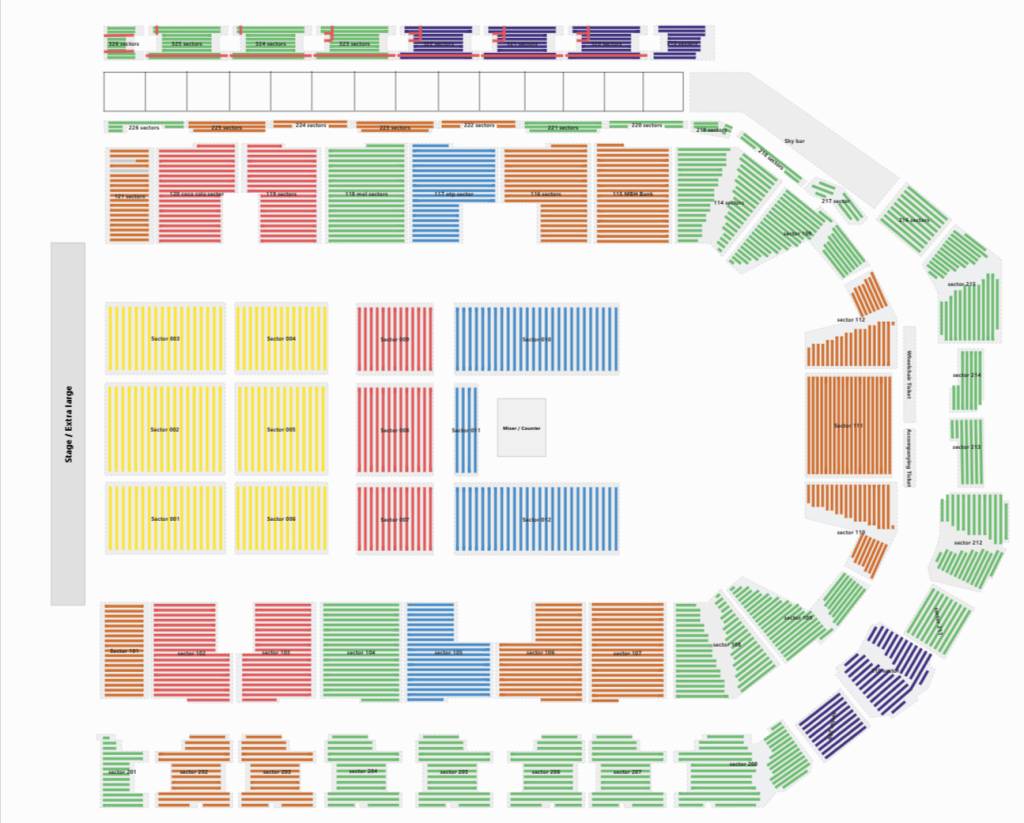
🎭 Large Theatre Seating
Perfect for Broadway-style venues, concert halls, and auditoriums with 500+ seats across multiple sections and pricing tiers. Now the demo handling 13000+ seats in total.
- Multiple sections (Orchestra, Balcony, VIP)
- Tiered pricing by row and section
- Wheelchair accessible seating zones
🥂 Gala Dinner Table Booking
Ideal for charity auctions, corporate galas, and wedding receptions. Allow guests to book entire round tables or individual seats with ease.
- Whole table booking functionality
- Custom table shapes (round, rectangular)
- Table host/co-host assignment features

🥊 Fighting Event & Ringside
Designed for MMA, boxing, and wrestling events. Manage high-demand ringside tables, VIP cageside seating, and general admission tiers seamlessly.
- Ringside table and chair mapping
- Dynamic tiered pricing (VIP to General)
- High-traffic mobile booking optimization
🏢 Trade Show Layout
Perfect for conventions, expos, and farmer’s markets. Allow exhibitors or attendees to select and book specific booth spaces interactively.
- Custom booth sizes and shapes
- Exhibitor name tagging on selection
- Aisle and facility feature mapping


🎟️ Small Theatre & Studio
Ideal for black box theaters, comedy clubs, and intimate performance spaces. Quick to set up and easy for your customers to navigate.
- Simple row and section mapping
- Fast 15-minute venue setup time
- Clear visual seat availability status
Everything You Need to Sell Tickets
🎨 Visual Drag-and-Drop
Create your venue in minutes — no coding needed. Simply drag seats, tables, and sections onto your canvas.
💰 0% Commission Fees
Keep 100% of your ticket sales. Unlike Eventbrite or Ticketmaster, we don’t take a cut of every ticket.
📱 Mobile-Friendly Booking
Visitors can pinch, zoom, and select seats on any device. Over 60% of tickets are now sold on mobile.
Frequently Asked Questions
Is the WordPress seating chart demo free to try?
Yes. All demos on this page are completely free. No account or login is needed. Simply click any seat or table to experience the full booking flow. But the for the admin view, you need to login by given credentials in the page.
Does the demo show the real WooCommerce checkout?
The demos show the full frontend seat selection experience including the cart summary and pricing. The checkout step uses a test environment so no real payment is taken.
Is the seating chart plugin mobile friendly?
Yes. Every demo works on mobile, tablet, and desktop. Visitors can pinch to zoom and drag to pan the seating map on any touchscreen device.
How long does it take to build a seating chart like these demos?
Most venue layouts take 15 to 30 minutes to build using the drag-and-drop builder. Complex multi-section venues may take longer. A done-for-you setup service is also available.
Ready to Keep 100% of Your Ticket Sales?
Join 2,500+ event organizers who’ve ditched expensive ticketing platforms. No commission fees. No hidden costs.
✓ 14-day money-back guarantee