


Tiered pricing — multiple price points on the same seating chart — is how professional venues maximize revenue, and if your WooCommerce event site charges everyone the same flat price regardless of where they sit, you’re leaving real money on the table. Every serious venue charges different prices for different seats. Front-row VIP tables at a gala are not the same price as back-row general admission. Orchestra stalls at a theater are not the same price as the upper circle. Premium ringside seats at a combat sports event are not the same price as standard standing.
If your WooCommerce event site is charging everyone the same flat price, you’re probably also frustrating the buyers who paid the same price as someone with a significantly worse seat. Tiered pricing — assigned to different sections or seat types — is how professional venues maximize revenue while giving buyers genuine choice.
Live Event Seating implements this through native WooCommerce variable products, which means it’s fully compatible with every WooCommerce payment gateway, coupon system, and analytics tool you already use.
Why Tiered Pricing Increases Total Event Revenue
The economics are straightforward: some seats are worth more than others, and some buyers will pay more for them. A flat pricing model either:
- Undercharges VIP buyers — someone who wants Row A, Seat 1 would happily pay £150, but you’re charging them £75 because that’s the standard price
- Overcharges budget buyers — someone who’s happy in the back row at £45 walks away because you’re charging £75 for everything
A three-tier pricing model captures both ends of the market:
| Zone | Price | Buyer Profile |
|---|---|---|
| VIP / Front Section | £150 | Corporate, premium experience, fan of performer |
| Standard | £75 | Most attendees, middle ground |
| Budget / Balcony | £45 | Price-sensitive buyers, young audience, first-timers |
Assuming 200-seat venue (40 VIP, 120 Standard, 40 Budget) vs. flat £75 pricing:
- Flat pricing: 200 × £75 = £15,000
- Tiered pricing: (40 × £150) + (120 × £75) + (40 × £45) = £6,000 + £9,000 + £1,800 = £16,800
That’s £1,800 more revenue from the exact same seats — just by charging different prices where the market supports them.
How Tiered Pricing Works in Live Event Seating
The implementation uses WooCommerce’s native Variable Products and Variations system. This keeps all pricing logic inside WooCommerce — not in a separate plugin database — which means it works correctly with your tax rules, discount codes, WooCommerce analytics, and payment gateway.
Step 1: Create a Variable Product for Your Event
In WooCommerce → Products → Add New:
- Set the product type to Variable Product
- Create an attribute called “Ticket Type” (or “Price Zone” — you choose the name)
- Add your tiers as values: “VIP”, “Standard”, “Budget”
Step 2: Create Variations and Set Prices
For each tier, create a variation and set the price:
- VIP → £150
- Standard → £75
- Budget → £45
Add stock quantities per variation if you want WooCommerce’s native stock management to apply.
Step 3: Assign Tiers in the Seat Map Builder
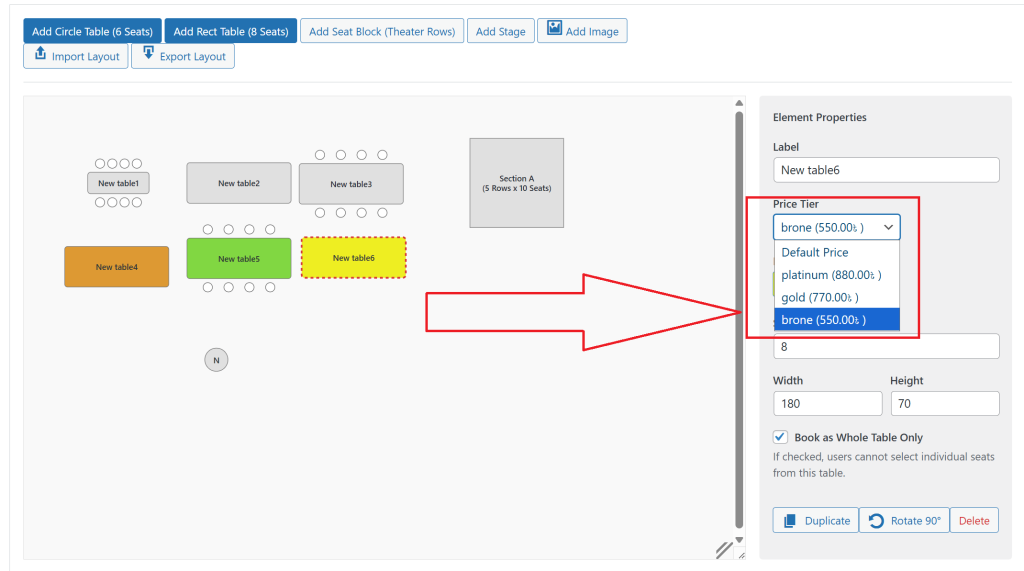
Back in the Live Event Seating builder, select each seat block or table section. In the settings panel, you’ll see a Price Tier dropdown populated with your product’s variations.
- Select the front rows → assign “VIP”
- Select the middle section → assign “Standard”
- Select the back section and balcony → assign “Budget”
That’s it. The map now has three pricing zones. When a buyer clicks a VIP seat, the VIP variation (£150) is added to cart. When they click a budget seat, the Budget variation (£45) is added. The buyer never needs to manually select a product variation — the seat does it for them.
How It Looks to the Buyer
On the frontend seating chart, price zones are visually distinguished by color — each tier gets its own color coded in the builder, and a legend at the bottom explains the pricing. For example:
🟡 VIP — £150/seat 🟢 Standard — £75/seat
🔵 Budget — £45/seat
When a buyer hovers over a seat, a tooltip shows the price for that specific seat before they click. When they select a seat, the sidebar panel shows the seat name and its price in real time.
For buyers comparing zones, the color-coded map makes the value proposition of different areas immediately clear. A buyer deciding between standard and VIP can see exactly where the boundary is and what they get for the extra money.
Common Tiered Pricing Configurations
Theater / performing arts venue:
- Orchestra stalls (rows A–E) → Premium: £85
- Stalls (rows F–M) → Standard: £65
- Circle → Upper Standard: £50
- Upper Circle / Standing → Budget: £35
Combat sports event:
- Ringside (first 3 rows) → VIP: £200
- Floor (rows 4–10) → Premium: £120
- Raised seating → Standard: £75
- Standing area → GA: £45
Corporate gala dinner:
- Sponsor tables (front zone) → Sponsor Table: £1,200/table
- Partner tables (middle zone) → Individual: £95/seat
- General tables (rear zone) → Individual: £65/seat
Conference:
- Reserved front rows → VIP Delegate: £245
- Standard seating → Standard Delegate: £145
- Rear section → Day Pass: £65
Combining Tiered Pricing with Early Bird Discounts
WooCommerce’s scheduling and discount features work natively with variable products. For early bird pricing:
- Add an “Early Bird” variation at £55 (vs. Standard £75)
- Set the variation to scheduled sale: available until [event date minus 30 days]
- After that date, the variation automatically reverts to the standard price
No manual price changes required. The early bird period ends automatically. Buyers who miss the window pay the standard price, with no special handling needed on your end.
Tiered Pricing and the Booking Manager
In the Booking Manager, each booking records which ticket tier was purchased alongside the seat and customer details. When you export to CSV, the tier name appears as a column — so you can instantly count how many VIP, Standard, and Budget tickets were sold, and what the revenue breakdown was, without building a custom WooCommerce report.
Stop charging everyone the same price for seats that clearly have different value. Tiered pricing takes 15 minutes to configure and typically increases revenue by 10–20% on the same attendance. Get Live Event Seating → Starting from $49.99/year · 14-day money-back guarantee · 0% per-ticket commission
Ready to Sell Walk-In Tickets the Smart Way?
Get Live Event Seating Pro and unlock manual order ticketing, the visual seat builder, QR check-in, and every Pro feature — in one plugin with zero per-ticket fees.