


How much did you pay Eventbrite last year?
If you’re a venue owner looking for a real Eventbrite alternative for venues, you already know the answer stings. Sell 5,000 tickets at $25 each and you hand over roughly $8,750 in platform fees — with nothing to show for it. No customer data. No recurring revenue lever. No loyalty. Just a line item that quietly drains your margin every single month.
👉 Quick math: Use our free Eventbrite Fee Calculator to see exactly how much you’d save.
That’s not a platform fee. That’s a second rent payment.
Live Event Seating is the Eventbrite alternative for venues built on WordPress — a flat annual fee with zero commission on every ticket you sell. Flat annual fee. Zero commission. Every dollar from a ticket sale goes to you — not Eventbrite, not Ticketmaster, not anyone else.
Here’s exactly how the math works, and five features where we don’t just match the big platforms — we beat them.
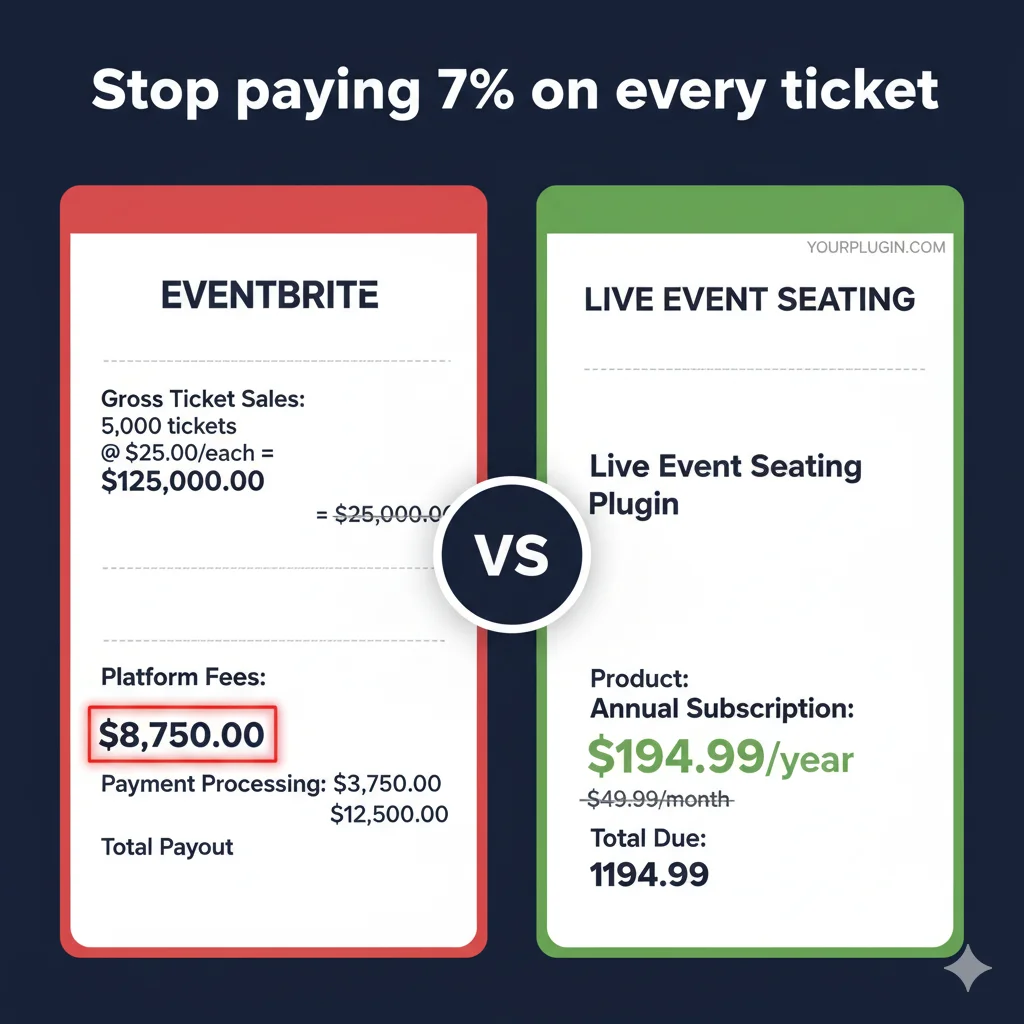
The Real Cost of Eventbrite for Venues — And the Alternative
Let’s make this concrete.
Eventbrite’s standard pricing for paid events is 3.5% + $1.79 per ticket. On lower-priced tickets ($20–$30 range), that works out to roughly 6–8% of your gross revenue disappearing before you see a cent. Add optional payment processing (2.9% + $0.30 per transaction if you use their Stripe integration) and you’re flirting with 10%.
Here’s the same event run through both platforms:
500 tickets × $25 = $12,500 gross Eventbrite fees: ~$1,775 Live Event Seating: $49.99-$194.99/year You keep: $1,725 more — on a single event
Scale that up and the gap becomes absurd:
💰 Fee Savings Calculator
| Scenario | Tickets Sold | Avg. Price | Eventbrite Fees (~7%) | Live Event Seating | You Save |
|---|---|---|---|---|---|
| Small venue | 500 | $25 | ~$875 | $49.99 | ~$825 |
| Mid-size venue | 2,000 | $25 | ~$3,500 | $99.99 | ~$3,400 |
| Busy venue | 5,000 | $25 | ~$8,750 | $194.99 | ~$8,555 |
| High-ticket | 1,000 | $75 | ~$5,250 | $194.99 | ~$5,055 |
The plugin pays for itself after a single weekend event. Everything after that is money back in your pocket.
5 Features Where We Win
1. Waitlist Management — Capture Revenue You’re Currently Losing
Eventbrite’s waitlist functionality is, generously speaking, an afterthought. For most event types it doesn’t exist at all. For others, it’s a basic notification system — it broadcasts to your entire attendee list and hopes the right person sees it first. No queue. No fairness. No urgency. Whoever refreshes the page at the right moment wins.
That’s not a waitlist. That’s chaos.
Live Event Seating has a purpose-built waitlist system that works the way venue managers actually need it to. When an event sells out, a clean signup form appears automatically — no account required. Attendees join a proper queue. The moment a cancellation triggers (automatically, from a refund or manual release), the next person in line receives a private, time-limited purchase link that expires in 30 minutes.
Why does the timer matter? Because urgency converts. A link that expires creates a decision; an open-ended notification creates procrastination.
For venues with 8–12% cancellation rates on popular events, this single feature can recover thousands in seats that would have otherwise gone unsold. A 150-seat event at $65/ticket losing 12 seats per show = $780 recovered, per event, automatically.
2. Visual Seat Selection & Transfers — Control That Eventbrite Can’t Match
Eventbrite’s seat assignment experience is functional but rigid. Reassigning a ticket to a different seat — say, when a guest calls to move from Row G to an accessible seat near the aisle — typically requires a cancellation and rebooking. That means fees. That means friction. That means a support headache your team has to manually resolve.
Our drag-and-drop seat map gives you and your guests a live, visual seating layout with real-time availability. Guests pick exactly where they want to sit. Your admin can transfer, swap, or reassign any seat from the backend in seconds — no cancellations, no re-charges, no Eventbrite support queue.
Does your venue deal with VIP upgrades, accessibility requests, or corporate table arrangements? This is the difference between a five-minute fix and a 45-minute phone call.
3. Bulk & Group Bookings — Built for Corporate and Event Planners
Group bookings are where Eventbrite consistently frustrates venue managers. The platform is optimized for individual ticket buyers, not for a corporate event planner trying to reserve 30 adjacent seats for a team dinner. Manual coordination, back-and-forth emails, and seats that get picked off by individual buyers while you’re still confirming the group — it’s a mess.
Live Event Seating includes a smart group booking system with automatic seat picker. A buyer selects a quantity; the system finds and locks the best available adjacent seats instantly. No manual intervention. No risk of partial availability.
For wedding halls and conference centers running multi-table events, this is not a nice-to-have. It’s the feature that determines whether your group bookings are profitable or a source of constant customer service headaches.
And because it runs through WooCommerce, group orders follow the same checkout, invoice, and order management flow as everything else on your site.
4. Concession & Add-On Sales — Keep 100% of Every Upsell
Here’s a detail most venues don’t think about until they see the invoice: Eventbrite takes its percentage on add-ons too. Selling a $15 dinner package alongside a $40 ticket? That’s another 3.5% + $1.79 skimmed off before it reaches you.
Live Event Seating lets you attach seat and table add-ons — food, drinks, merchandise, VIP packages — directly to the booking flow. A guest picks their seat, then selects from whatever add-ons you’ve configured: a dinner option, a bottle of champagne, a reserved parking spot.
Every dollar from those upsells goes through WooCommerce. Zero commission to anyone.
For venues where food and beverage revenue is a meaningful part of the event P&L — which is most of them — this matters. A 200-guest dinner event where 60% of guests add a $20 drink package is $2,400 in F&B revenue. On Eventbrite, you’re handing over ~$168 of that. Here, you keep all of it.
5. Data Ownership — The Most Expensive Thing Eventbrite Takes
Here’s the one that doesn’t show up on any fee invoice: Eventbrite owns your customer relationships.
When someone buys a ticket through Eventbrite, they become Eventbrite’s customer. The platform controls the email communication. They can market to your attendees, recommend competing events, and — critically — if you ever leave the platform, you lose the relationship history. Your guests’ contact data lives in their database, not yours.
This is not a small thing. The industry benchmark for email list value is roughly $1 per subscriber per month. A venue that has run 20 events over two years and built up 3,000 past attendees has a list worth $3,000/month in direct marketing potential — if they own it.
With Live Event Seating running through WooCommerce, every customer who buys a ticket creates a WooCommerce order on your site. Their name, email, purchase history, and preferences are yours. You can build retargeting lists, send pre-sale announcements, offer loyalty discounts, and run email campaigns — all without paying Eventbrite to do it for you.
Own your data. Own your audience. Own your revenue.
The Hidden Cost of Not Owning Your Data
Let’s put a number on it.
Imagine you’ve run events on Eventbrite for three years and accumulated 4,000 past ticket buyers. If you left tomorrow, those 4,000 relationships stay with Eventbrite. You’d be starting from zero.
At $1 per subscriber per month, that list is worth $4,000/month in email marketing value — $48,000/year. Not hypothetical revenue; real, proven ROI from owned audience marketing. Venues that send a single pre-sale email to a list of 4,000 past attendees routinely sell out their first allocation before a single ad runs.
That asset is being built right now — in either Eventbrite’s database or yours. The choice of platform is the choice of who owns it.
Who This Is For
Live Event Seating is the right fit if you’re a WordPress-based venue selling anywhere from 500 to 10,000 tickets per year.
That means theaters, wedding halls, conference centers, corporate event spaces, and hospitality venues running ticketed dinners, galas, or seasonal events. If you’re currently paying Eventbrite or Ticketmaster a percentage of every ticket and you have a WordPress site (or are willing to set one up), this plugin will pay for itself many times over in year one.
It’s also the right fit if you’re running multiple event types — assigned seating, general admission, hybrid — and need a flexible system that handles them all from a single backend.
Make the Switch — Before Your Next Event
Every event you run on Eventbrite between now and when you switch is another check you’re writing to their shareholders.
Live Event Seating starts at $49.99/year for the basic plan and $194.99/year for the Pro plan with the full feature set — waitlist, group bookings, add-ons, seat transfers, and more. Both come with a 14-day money-back guarantee. If it’s not right for your venue, you get a full refund. No questions.
The math is straightforward: one recovered seat from the waitlist system covers months of the subscription. One corporate group booking handled without a support call saves your team real time. One F&B upsell campaign through your own email list pays for the year.
If you’ve been searching for a true Eventbrite alternative for venues that runs on your own site with no per-ticket cut, this is it.
Stop paying commission on your own events.
Feature Comparison Table
| Feature | Eventbrite | Live Event Seating |
|---|---|---|
| Per-ticket commission | ✅ Yes (~7%) | ❌ None |
| Annual flat fee | ❌ No | ✅ $49.99–$194.99/yr |
| Visual seat map | ✅ Basic | ✅ Full drag-and-drop |
| Waitlist system | ❌ Limited/extra cost | ✅ Included, automated |
| Timed purchase link (waitlist) | ❌ No | ✅ 30-min expiry |
| Seat transfers & swaps | ❌ Requires cancel/rebook | ✅ One-click in admin |
| Group/bulk booking | ❌ Manual coordination | ✅ Auto seat picker |
| Concession/add-on sales | ✅ Yes (with fee cut) | ✅ Yes (0% commission) |
| Customer data ownership | ❌ Eventbrite owns it | ✅ You own it |
| WooCommerce integration | ❌ No | ✅ Native |
| Email list portability | ❌ Locked to platform | ✅ Full export anytime |
| Money-back guarantee | ❌ No | ✅ 14 days |
P.S. — Still running events on Eventbrite and not sure how much you’re actually losing? Reply to this post or contact us here for a free 15-minute fee audit. Bring your last year’s event data and we’ll show you the exact number.
See Your Exact Savings
Plug your numbers into the Eventbrite Fee Calculator and see the annual gap. Then compare it to Live Event Seating — $194.99/year, 0% commission, unlimited tickets.
For a complete feature and fee comparison, see: Live Event Seating vs Eventbrite →