

seating chart features

Discover the comprehensive list of WordPress seating chart features available in Live Event Seating. Designed to integrate seamlessly with WooCommerce, our plugin provides everything you need. Consequently, you can manage venues, sell tickets, and impress your attendees with ease.

Explore Our WordPress Seating Chart Features
An Interactive Booking Experience for Your Customers with the features of WordPress Seating Chart plugin
Give your attendees the premium, “click-to-pick” experience they expect, notably on any device.
- Interactive SVG Map: Your customers see a beautiful, fast-loading WordPress seating chart where they can visually select seats instead of using confusing dropdowns.
- Touch & Mobile Ready: Similarly, the map is fully responsive. Users can pan with a single finger and zoom in to select seats on any smartphone or tablet.
- Flexible Booking Modes: You can configure tables to be booked by individual seats. Alternatively, you can enforce “Whole Table Only” bookings, which are then cleanly displayed as a single item in the cart.


Design with Precision: Advanced seating chart Builder Controls
Your digital map should perfectly match your real-world venue. Therefore, our visual builder gives you the detailed control needed to achieve this. Every element can be fine-tuned for a truly accurate layout. Unquestionably, this precision is valued by professional WordPress seating chart plugin.
- Resize Elements: Need a wider stage or a longer table? In this case, the size of rectangular tables, stages, and seat blocks can be changed. The perfect size is achieved by simply dragging the corners to your desired dimensions.
- Rotate Elements: Moreover, rectangular tables and seat blocks can be rotated 90 degrees. This allows you to create vertical or horizontal layouts, which helps you fit more into your floor plan.
- Adjust Circle Radius: You are given full control over circle tables. For instance, you can easily adjust the radius to create smaller bistro tables or larger gala rounds, and the surrounding seats will automatically adjust to the new size.
Stop fighting with code or complex settings. Instead, our intuitive, drag-and-drop admin interface gives you complete control to build a perfect digital twin of your venue.
- Dedicated Event Management: First and foremost, a user-friendly “Events” area is created right in your WordPress admin. You can easily add new events, write descriptions, and manage all your event-specific settings.
- Flexible Layout Elements: You can go beyond basic tables. For instance, you can add resizable circle tables, rectangle tables, stages, decorative images, and even theater-style seat blocks.
- Theater & Row-Based Seating: Moreover, you can create structured “Seat Blocks” with configurable rows and seats-per-row. This is perfect for theaters, lecture halls, and auditoriums.
- Precision Controls: In fact, you can effortlessly resize, rotate, and position every element on the canvas. As a result, your digital map will perfectly match your physical layout.
- Effortless Navigation: For large and complex charts, you can use the built-in zoom and pan controls to navigate your layout with ease. In addition, the builder canvas itself is also resizable, giving you all the space you need.
- Layout Templating: You can save hours of work. Specifically, you can export any completed layout as a .json file and instantly import it into future events.

Robust Ticketing & Sales by Your WordPress Seating Chart features
Leverage the full power of the world’s most popular eCommerce platform for secure and flexible ticket sales.
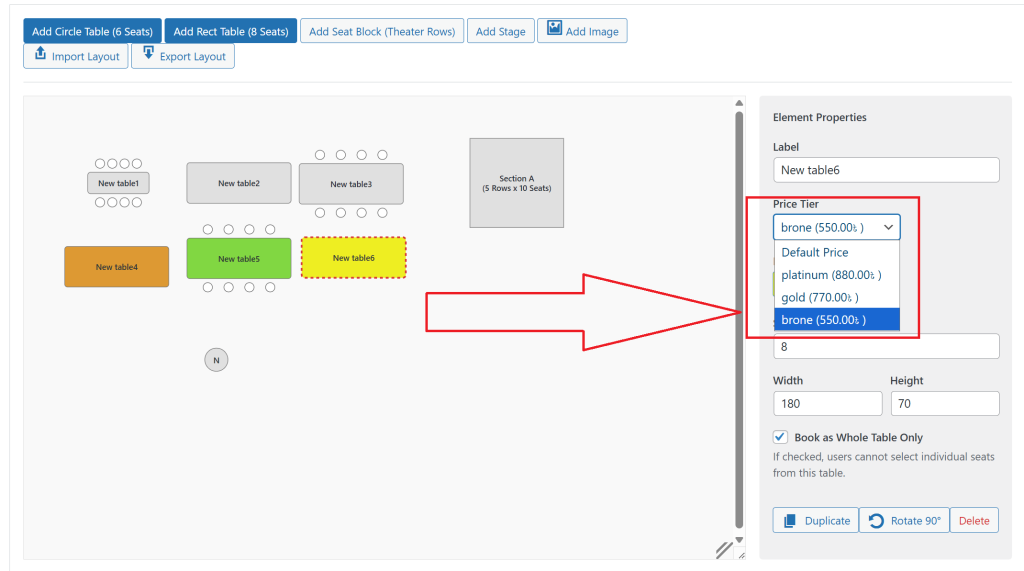
- Tiered & Variable Pricing: For example, you can link your event to a WooCommerce Variable Product to set different prices for different sections (like “VIP” or “Standard”) and assign them directly in the builder.
- Seamless Cart & Checkout: A user’s selection, whether it’s a single seat or a whole table, is clearly displayed with its correct name and price throughout the entire WooCommerce checkout process.
- Real-Time Seat Locking: Furthermore, our system prevents double-bookings. The moment a seat is added to a cart, it is temporarily “soft-locked” and becomes unavailable to other users.
Complete Event-Day Management Tools– Pro Features
Your toolkit doesn’t stop after the sale. In other words, we provide everything you need to run a smooth and professional event on the day.
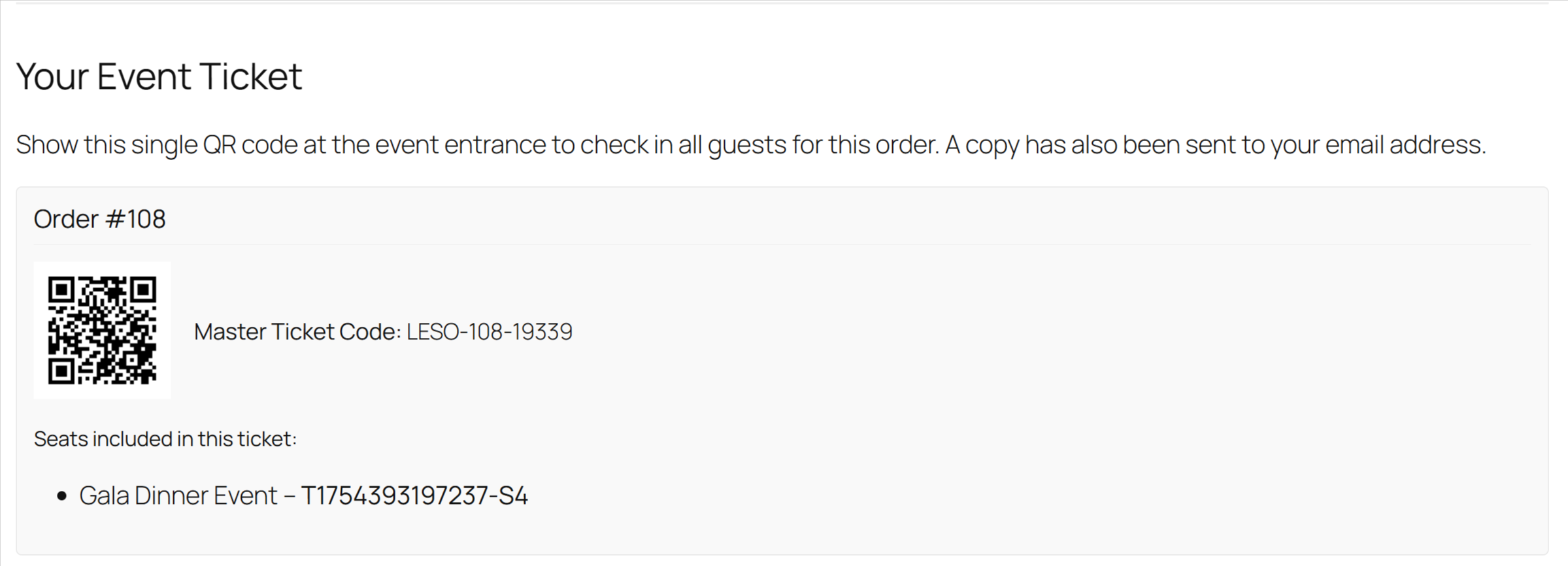
- Automatic QR Code Tickets: A single, unique QR code is generated for each order. Subsequently, it is automatically displayed on the “Thank You” page and sent in the customer’s order confirmation email.
- Printable Tickets: Additionally, a “Print Ticket” button on the confirmation page allows customers to easily print a clean, scannable copy of their ticket.
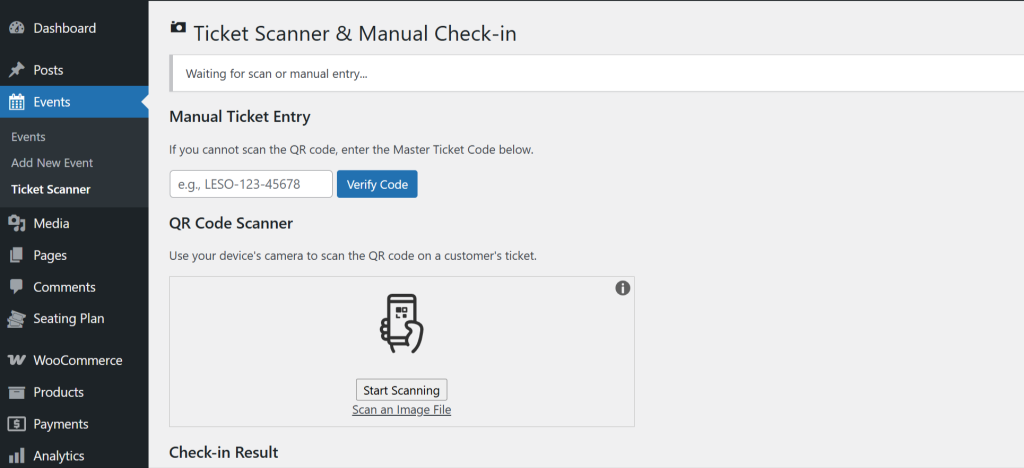
- Integrated Ticket Scanner: A dedicated “Ticket Scanner” page in your admin area turns any device with a camera into a powerful check-in station.
- Manual Check-in & Fraud Prevention: Besides that, it includes a fallback input field for manual code entry and prevents the same ticket from being scanned twice.
Intelligent Seating Chart Settings & Controls
Fine-tune the booking logic to match your exact needs from a centralized settings dashboard.
- Full Customization: Finally, you can use color pickers to style all seat statuses to perfectly match your brand.
- “Orphan Seat” Prevention: An optional rule to prevent users from leaving a single, unsellable empty seat at a table.
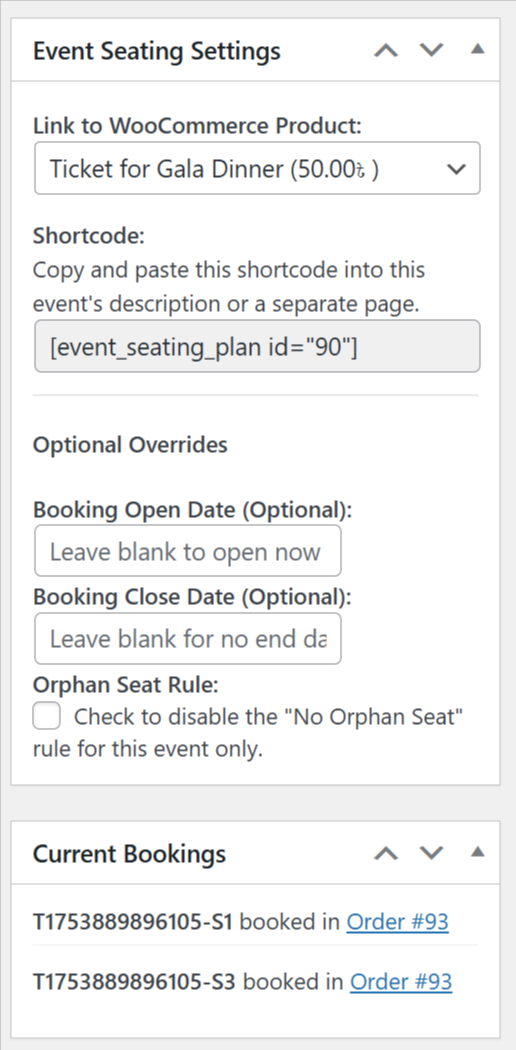
- Per-Event Overrides: In particular, for any specific event, you can override global settings, such as the booking window or the orphan seat rule.
- Global Limits: You can set a “Max Seats Per Order” to ensure fair ticket distribution.
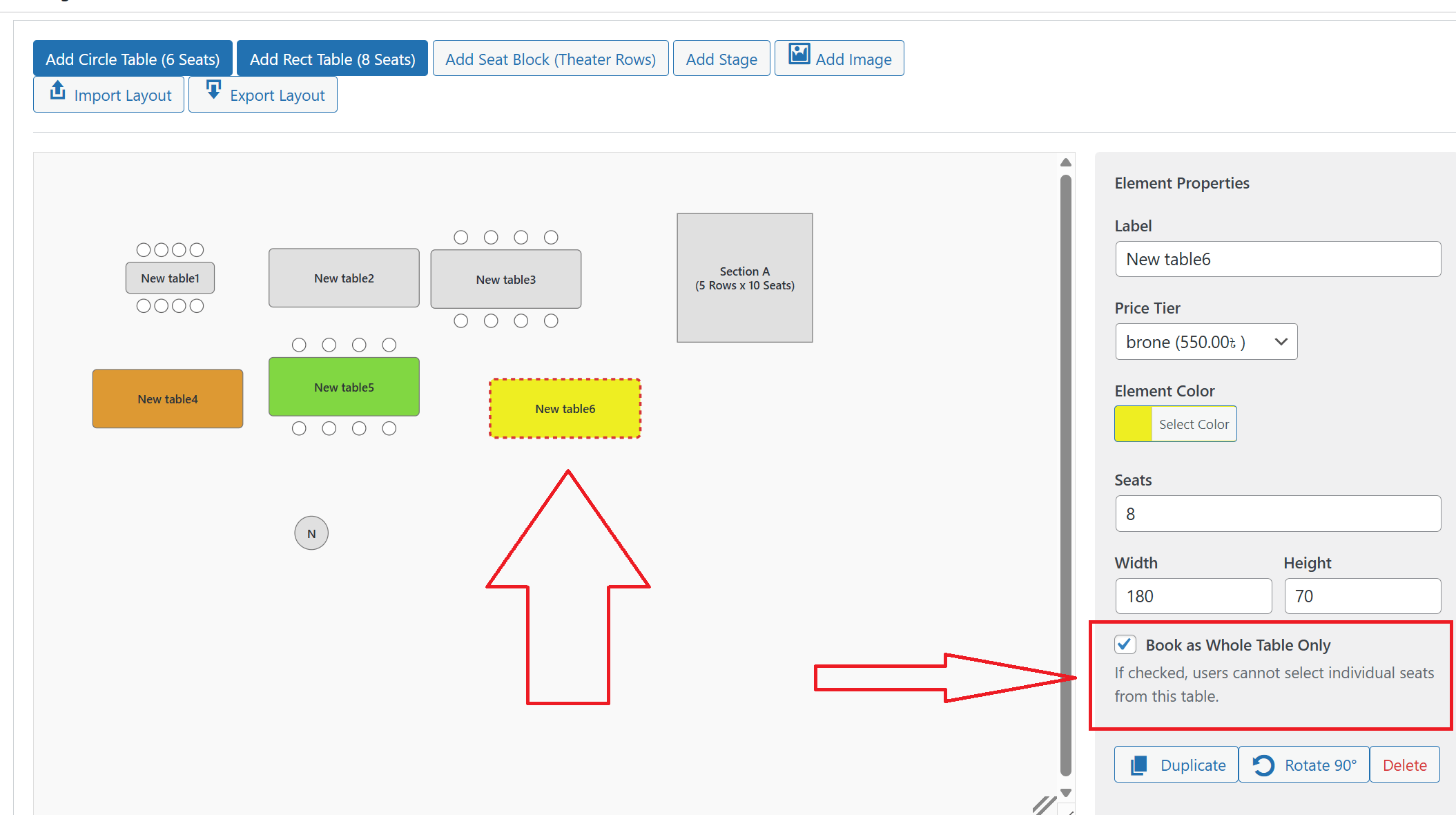
WordPress Seating Chart Features: Whole Table Booking
- Selling individual seats isn’t always right for galas or corporate events. Fortunately, our WordPress seating chart plugin understands this. You are given the power to designate any table as “whole table booking only.” This completely changes the customer experience. Specifically, individual seats on that table are no longer shown, and the table itself becomes the selectable item.
- Indeed, a single click is all that is needed to select the entire table. The user’s summary instantly updates with one clear line. For example, it will show “VIP Table (10 Seats)” and the total price. The cart is also updated with this single, easy-to-understand item. Ultimately, this provides a simple, premium booking experience for your most important groups and makes booking a corporate sponsorship table truly effortless.
Save Time with Reusable Layout Templates– Pro Features
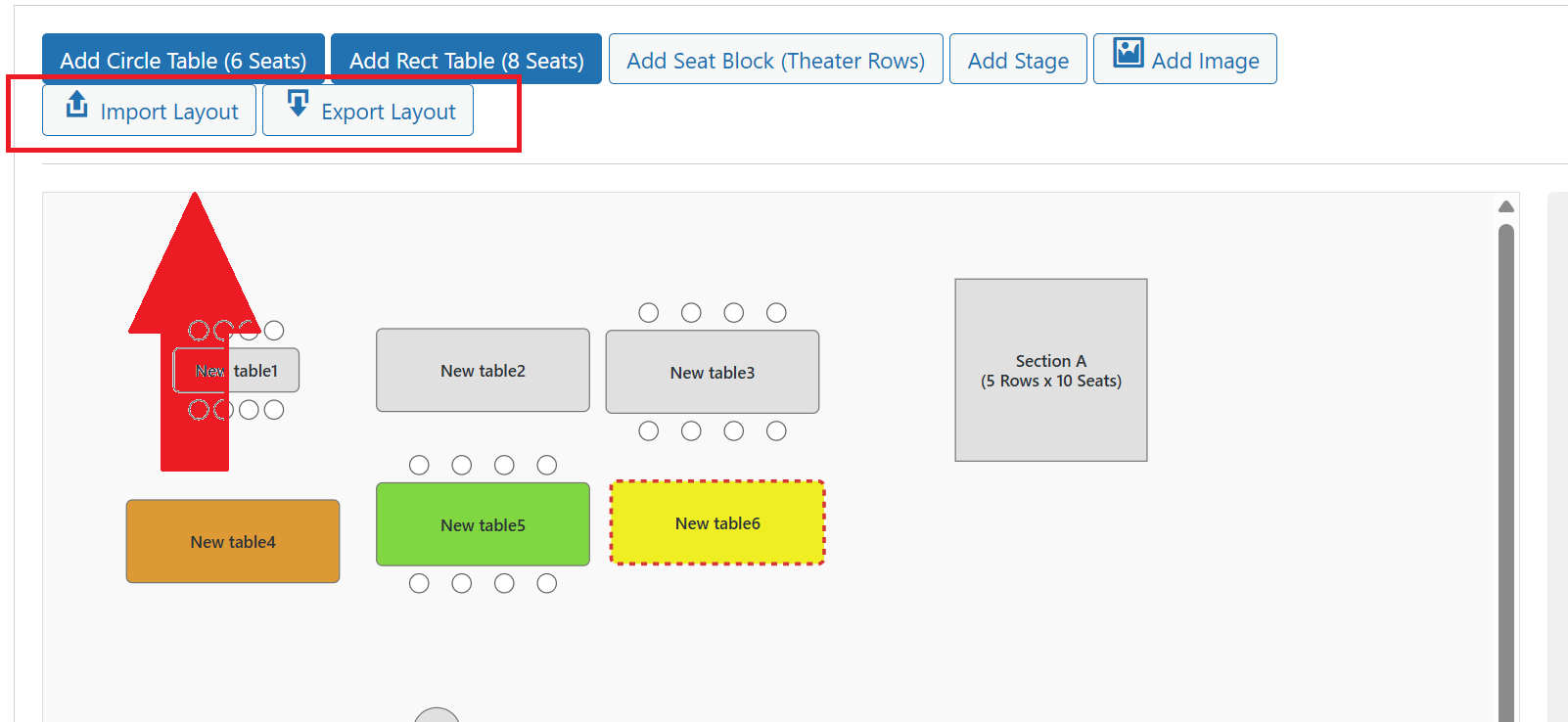
- Stop rebuilding your venue layout for every new event. Instead, One of our most popular WordPress seating chart features is the ability to create once and use forever. Unquestionably, this feature is a massive time-saver for anyone with recurring events or multiple venues, as it streamlines your entire setup process.
- Your perfected layout can be exported as a simple .json file. In fact, this file saves everything: element positions, sizes, colors, and even price tiers. Then, when you create a new event, just click the “Import Layout” button. After you select your saved template file, the entire seating chart is instantly recreated. Consequently, any new event can be set up in mere seconds. Ultimately, you can build an entire library of templates for all your different rooms and configurations.
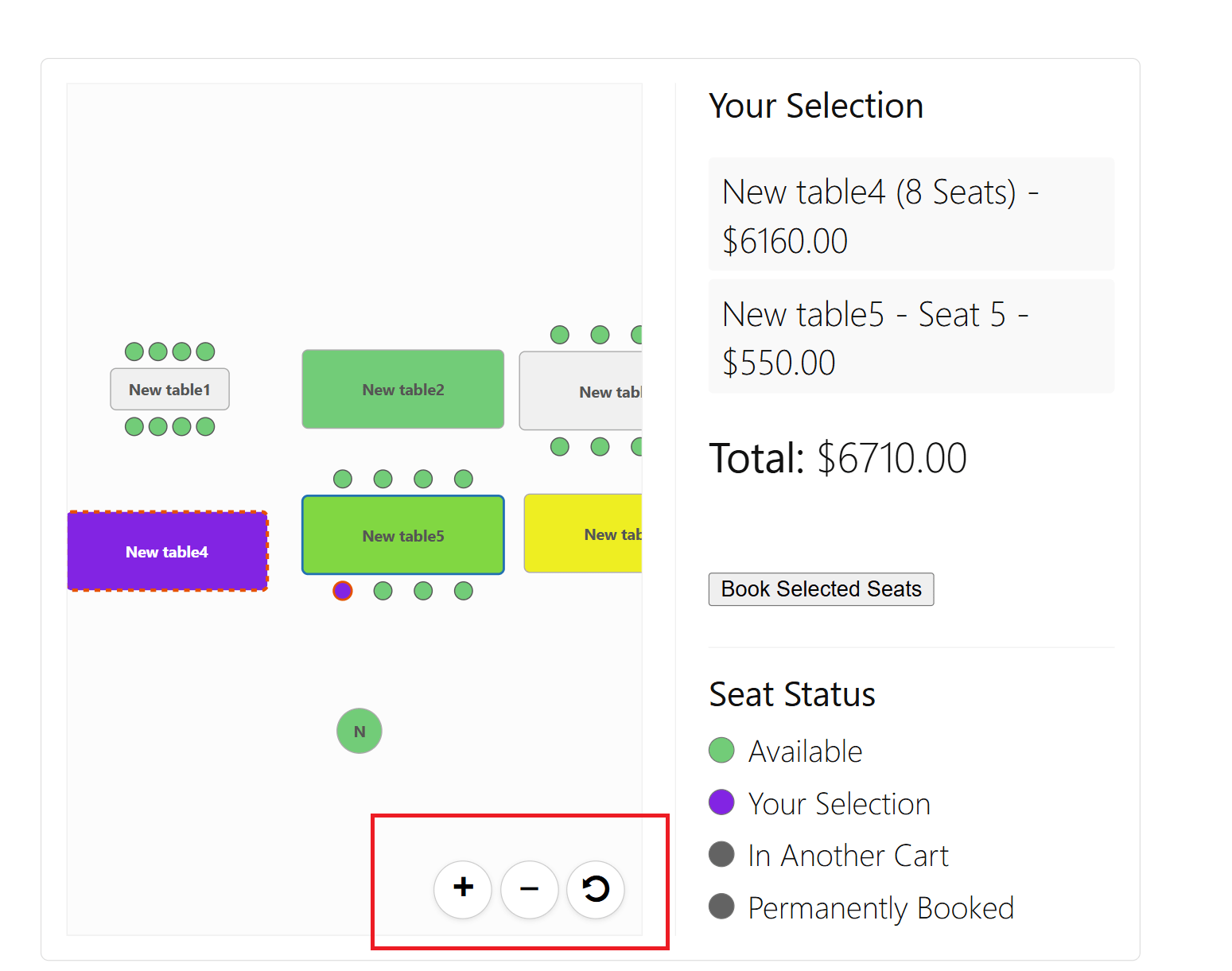
Complex seating charts should not be difficult to manage. Therefore, a smooth navigation experience is provided for both admins and customers. As a result, large and detailed layouts are now easy to work with on any screen.
- Frontend Mobile Experience: Your customers get the same power. Specifically, on a mobile device, they can use intuitive touch gestures. A simple pinch gesture can be used to zoom, while a one-finger drag is used to pan the map. This ensures a flawless and accessible booking experience, even for the largest venues.
- Admin Builder Navigation: The admin canvas features powerful zoom and pan controls. For example, you can zoom in to fine-tune a specific area or pan across a large floor plan with a simple click-and-drag. In addition, the builder canvas itself is also resizable.
Manually Setting Booking Status
This is an essential tool for managing your event inventory without creating a formal order.
- How it works: For any bookable element (Tables or Seat Blocks), a “Status” dropdown will appear in the inspector.
- Available: This is the default. The element and its seats are available for customers to book.
- Booked / Unavailable: If you select this, the entire element (and all seats within it) will be instantly marked as “Booked” on the frontend. This is perfect for:
- Reserving seats for VIPs or special guests.
- Blocking off tables for staff or technical equipment.
- Holding seats that were sold offline.
This manual override gives you complete control to block off any part of your seating chart from public sale.


Pro Features: Taking Your WordPress Seating Chart plugin to the Next Level
✅ Full Block Editor Support
Create your seating plans with confidence directly within the modern WordPress Block Editor (Gutenberg). Our latest update ensures that every change is saved reliably, providing a seamless and integrated experience. No need for the Classic Editor plugin anymore!
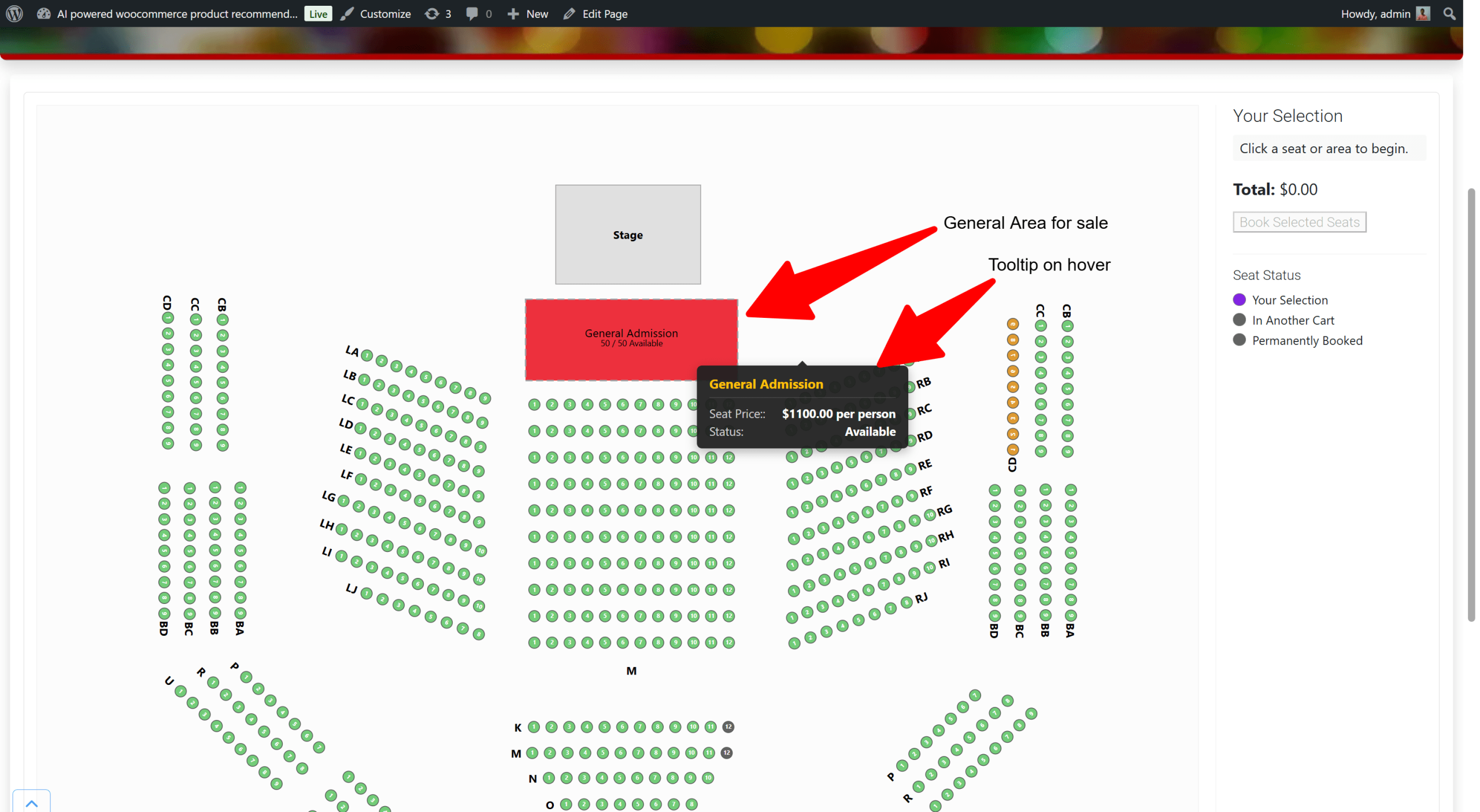
General Admission (GA) Areas with Capacity Control – Pro Features
Perfect for concerts, festivals, or hybrid events with standing sections.
- Create GA Zones: Add rectangular or custom-drawn freeform areas for standing room.
- Manage Capacity: Set a maximum number of tickets for each GA area. The system automatically tracks sales and displays the remaining availability to customers.
- Flexible Booking: Customers can choose the number of GA tickets they want from a simple quantity selector, making booking fast and easy.
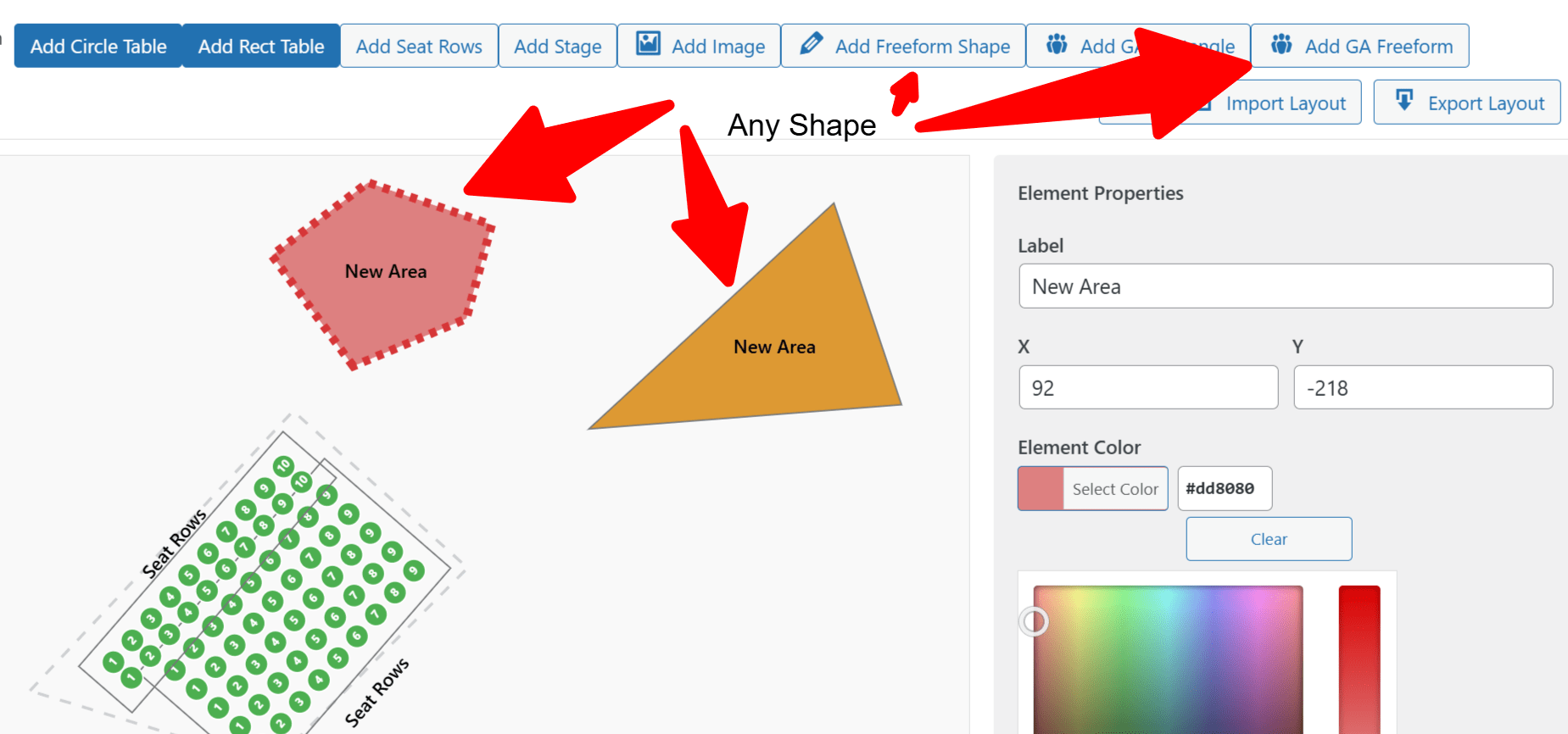
Freeform Drawing Tools – Pro Features
Your venue isn’t a perfect square, so why should your seating chart be?
- Draw Anything: Create decorative polygons to represent architectural details, dance floors, bars, or any other feature in your venue.
- Custom GA Shapes: Draw a General Admission area that perfectly matches the organic shape of a festival ground or standing pit.
- Intuitive Drawing: Simply click to add points and create any shape you need. Finish by double-clicking or clicking the starting point.
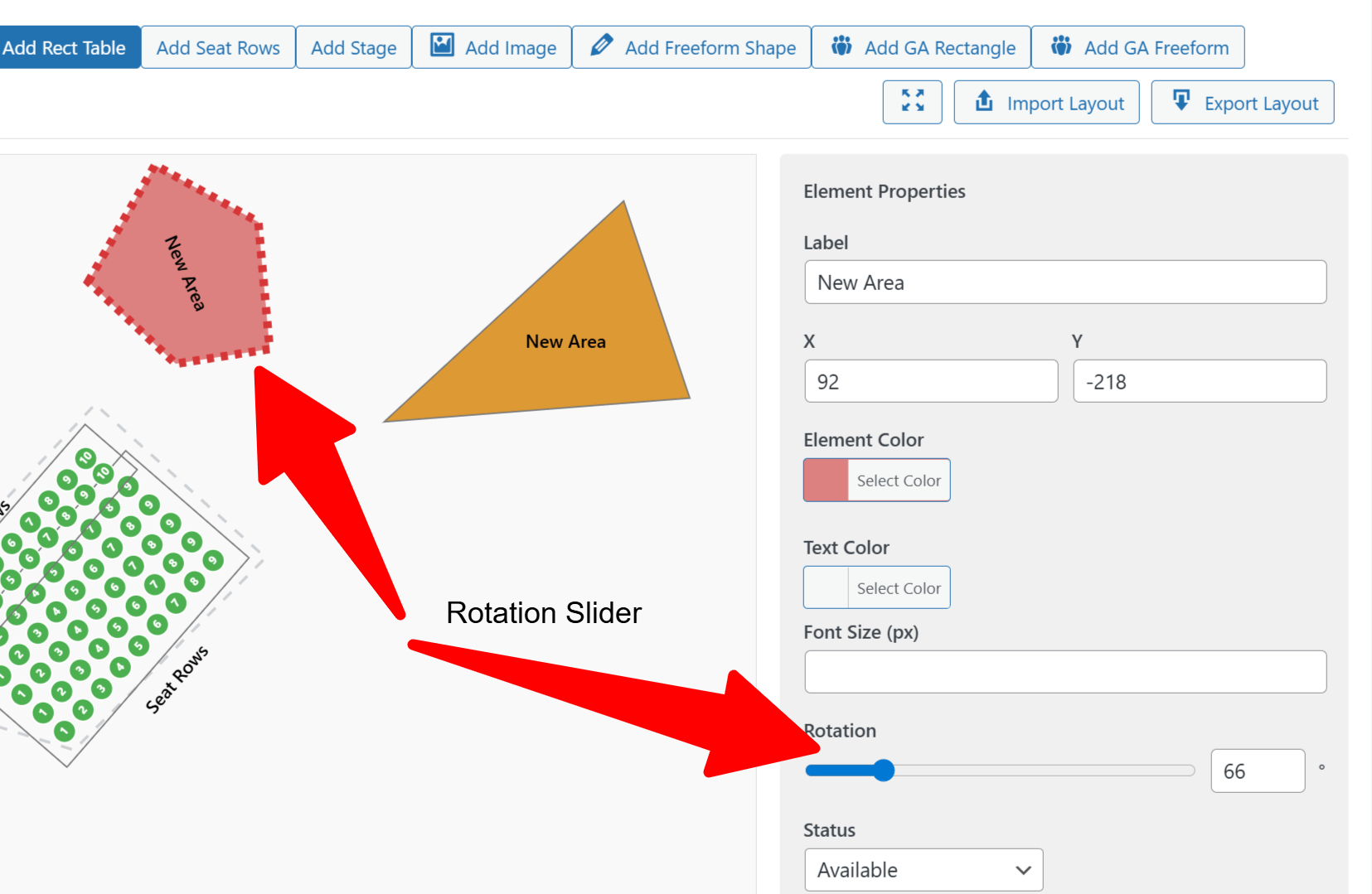
Precision 360° Rotation Slider – Pro Features
Forget rigid 90-degree turns. Position your elements with perfect accuracy.
- Fine-Tune Your Layout: A new, user-friendly slider allows you to rotate tables, seat blocks, and other elements from 0 to 360 degrees.
- Live Visual Feedback: See your elements rotate in real-time as you drag the slider.
- Exact Input: Type a precise degree value for perfect alignment.
True WYSIWYG Seat Block Builder
No more guesswork! The builder now shows you exactly what your customers will see.
- Visual Seat Rendering: When you add a “Seat Block” for theater-style rows, the builder now draws every single seat circle inside the block.
- Instant Updates: See the grid of seats update instantly as you change the number of rows, seats per row, or the dimensions of the block.
- Realistic Preview: What you design in the admin panel is now a perfect representation of the final seating chart.
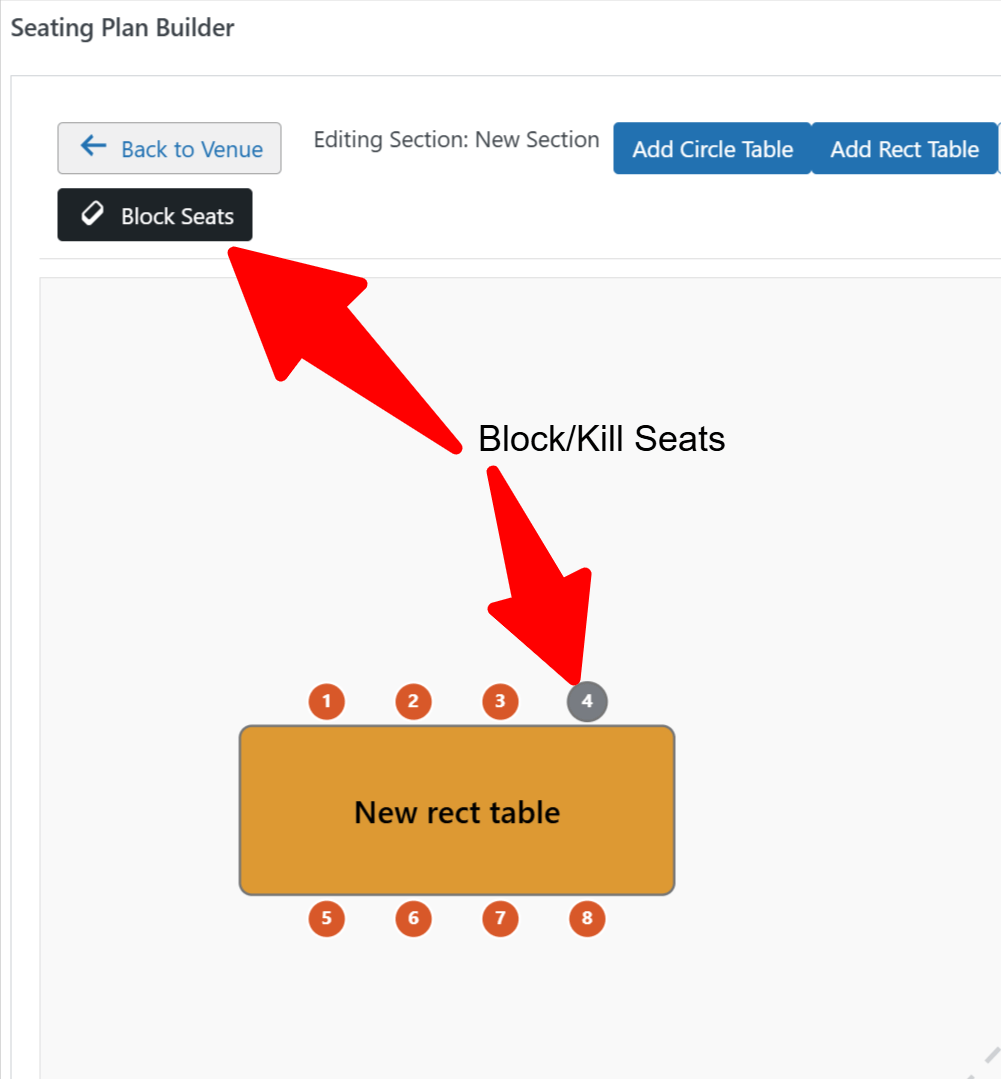
Total Control with Seat Blocking & Holds – Pro Features
Do you need to hold seats for VIPs, press, or staff? First, use the “Block Seats” tool. Then, instantly mark specific spots as unavailable on your chart before sales go public. Among the WordPress seating chart features, our new Block Seats tool gives you the power to make any individual seat unavailable for public sale, right from your visual builder.
This feature, known in the professional ticketing world as creating “seat holds” or “kill seats,” is now accessible to everyone with a simple, intuitive interface.
- Reserve Seats with a Click: Activate “Block Mode” and simply click on any available seat to instantly make it un-bookable. Click it again to release the hold. It’s that easy.
- Perfect for Any Scenario: Whether you’re holding seats for staff, blocking spots with an obstructed view, or reserving a row for special guests, you have complete control over your inventory.
- Seamless for Customers: Any seat you block will appear as “unavailable” on the frontend map. This prevents customer confusion and ensures they only see the seats that are actually for sale.
Stop manually tracking reserved seats or using complicated workarounds. With the Block Seats tool, you can manage your venue like a pro, ensuring every seat is allocated exactly as you intend.
Advanced Layout Sculpting (Kill Seats)
We have added a powerful new design tool to the Seating Plan Builder: Kill Seat Mode.
Real-world venues are rarely perfect squares. You often have curved rows, angled aisles, or structural pillars that interrupt seating blocks. Previously, creating these irregular shapes required creating many small, separate rows.
With the Kill Seat feature, you can now:
Smart Logic: The system is smart enough to treat killed seats as walls—ensuring your “No Orphan Seat” rules calculate correctly around these empty spaces.
Sculpt Seat Blocks: Create a large rectangular block of seats and simply “kill” the corners to create pyramids, circles, or curved theatre rows.
Handle Obstacles: Easily remove specific seats where a pillar, sound desk, or camera crew might be located.
Clean Frontend UX: “Killed” seats remain visible to you in the admin panel (for management purposes) but are completely invisible to the customer on the frontend.

Design Faster with Advanced Selection & Group Actions
Building a large, complex seating chart? We’ve supercharged the builder with professional-grade tools designed to dramatically speed up your workflow. Arrange, duplicate, and manage your layout with the speed and efficiency of a desktop design application.
1. Multi-Select with Marquee Box
Instantly select groups of elements without tedious individual clicks.
- Click and Drag: Simply click on an empty area of the canvas and drag to draw a selection box (“marquee”) over the elements you want to select.
- Group Everything: Effortlessly select entire sections of tables, seat blocks, or any other elements to manage them as a single unit.

2. Add or Remove with Shift + Click
Fine-tune your selection with precision.
- Hold Shift and Click: After selecting a group, hold the Shift key to click on individual elements. Therefore, this will add them to your selection or remove them if they’re already selected. It’s the perfect way to make precise adjustments.
3. Group Dragging, Duplication, and Deletion
Once you’ve selected multiple elements, you can manage them all at once.
- Move in Unison: Click and drag any single element from a selected group, and the entire group will move together, maintaining their relative positions perfectly.
- Duplicate Sections Instantly: With a group of elements selected, just click the “Duplicate” button. The entire section will be copied, ready for you to drag into place. This is a massive time-saver for symmetrical layouts.
- Delete in Bulk: Select multiple items and click the “Delete” button (or press the Delete/Backspace key) to remove them all at once.
These new power-user tools are designed to make building and editing your seating charts faster, more intuitive, and more enjoyable. Spend less time clicking and more time perfecting your event layout.

Build Your Perfect Venue with Powerful Layout Tools – Pro Features
Whether your event is in a simple hall or a complex theater, our builder has you covered. Choose the layout mode that fits your needs and create a beautiful, interactive seating chart in minutes.
- Single Layout Mode: Perfect for straightforward venues! If you’re hosting an event in a single room, hall, or open space, this mode lets you get started instantly. Add tables, rows of chairs, and other elements directly onto a single canvas for a fast and intuitive setup.
- Section-Based Layouts: Tame complex venues with ease. The “Use Sections” mode is designed for theaters, stadiums, or multi-room events. Draw distinct areas like “Balcony,” “Orchestra,” or “VIP Lounge,” and then manage the seating within each section independently. This keeps your chart organized and provides a clear, zoomable experience for your customers on the frontend.
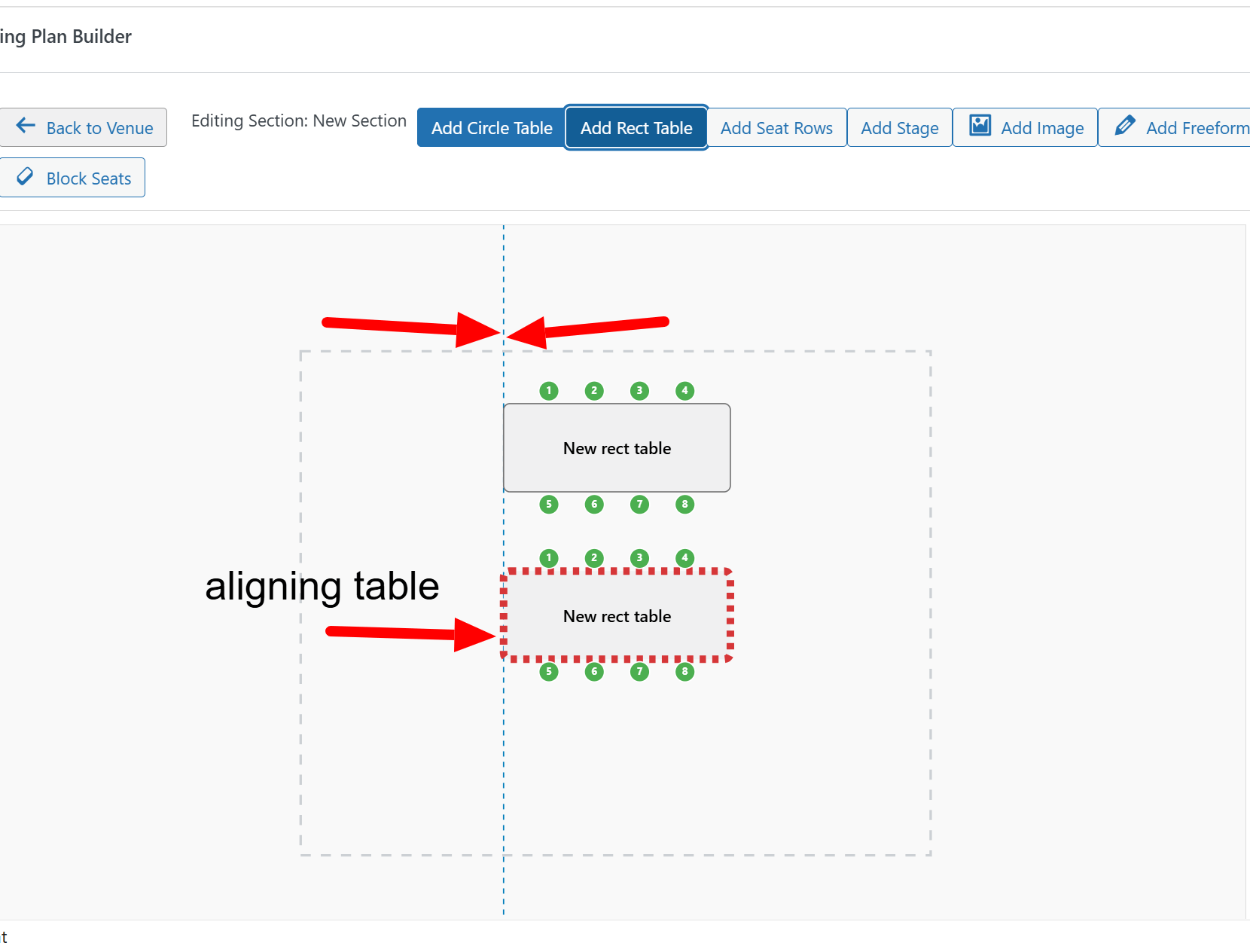
Design Like a Pro with Smart Alignment Guides – Pro Features
Say goodbye to guesswork and uneven layouts. Our new Smart Alignment Guides transform the builder into a professional design tool.
- Pixel-Perfect Precision: As you drag any element—or even a group of selected elements—on the canvas, dynamic guide lines automatically appear.
- Instant Visual Feedback: These guides instantly show you the top, bottom, center, left, and right boundaries of your selection, making it incredibly easy to align objects with each other or center them perfectly on your chart. Create clean, symmetrical, and professional-looking seating plans every time.
Prevent Double Bookings with Real-Time Availability
Offer a seamless and frustration-free booking experience for your customers. Our wordpress seating chart is now a live environment that keeps everyone in sync.
- Live Seat Status Updates: The frontend chart automatically polls the server every 20 seconds for the latest availability. When a seat is booked or held in another user’s cart, it instantly grays out for everyone else.
- Reduce Customer Confusion: This real-time update prevents the classic problem of two customers trying to buy the same seat at the same time. It reduces abandoned carts, minimizes support requests, and ensures a smooth, reliable transaction process for your event attendees.

Introducing Sections for Complex Venues! – Pro Features
Struggling to map out a venue with multiple rooms, floors, or distinct areas? Our groundbreaking Sections feature is the solution. Now you can:
- Build Hierarchical Layouts: Divide your venue into logical areas like “Orchestra,” “Balcony,” “Main Hall,” or “Patio.”
- Add Freeform Sections: Perfectly trace the outline of any custom-shaped area with our easy-to-use polygon drawing tool.
- Drill-Down to Edit: Simply double-click a section to “zoom in” and manage its internal layout, adding tables, seat rows, and other elements.
- Organize with Clarity: Keep your main venue map clean and understandable, showing an overview of each section. Elements placed inside a section move with it, making reorganization a breeze.
Work with Confidence: Full Undo & Redo Support
Ever accidentally moved a table, deleted the wrong section, or just changed your mind about a layout choice? With our robust Undo and Redo functionality, you can design with complete creative freedom. The builder now keeps track of your changes, allowing you to step backward and forward through your actions instantly.
This powerful feature transforms your design process, making it faster, more intuitive, and stress-free.
- Correct Mistakes Instantly: No need to panic. A misplaced element or an accidental deletion can be reversed with a simple keyboard shortcut.
- Experiment Fearlessly: Want to see how the layout looks with the stage on the other side? Go for it! If you don’t like it, you’re just one “undo” away from your previous version. This encourages creativity and helps you find the perfect arrangement.
- Boost Your Workflow: Spend less time manually fixing errors and more time perfecting your seating plan. It’s a professional-grade feature that works just like your favorite design software.
How it works:
- Undo: Ctrl+Z (or Cmd+Z on Mac)
- Redo: Ctrl+Y (or Cmd+Shift+Z on Mac)
Create Stunning Curved Seating with Ease!
Take your venue design to the next level. One of our most requested WordPress seating chart features is finally here: Curved Seat Rows. Now you can move beyond simple straight lines and accurately model the sophisticated layouts of real-world theaters and stadiums.
Key Benefits of this Feature:
- 🎭 Model Venues with Precision: Perfect for theaters, concert halls, and arenas. Unlike basic plugins, our advanced WordPress seating chart features allow you to replicate complex architectural curves, giving customers an authentic view of the stage.
- 🎨 Enhanced Visual Appeal: Elevate your charts from basic grids to professional-grade layouts. Curved seat rows are dynamic and aesthetically pleasing, instantly improving the user experience and perceived value of your event.
- 🎚️ Intuitive Control Slider: No complex tools needed. A simple “Curve” slider in the builder gives you complete control. Adjust the arc of your curved seat rows in real-time—positive values create a “smile,” and negative values create a “frown.”
Perfect For:
- Theater Balconies & Orchestra Pits
- Amphitheater & Arena Seating
- Conference & Banquet Arcs
Upgrade your event management today and give your attendees the most accurate booking experience available with these powerful WordPress seating chart features.
The new Curved Seat Rows feature is perfect for:
- Theater Balconies & Orchestra Pits
- Amphitheater & Arena Seating
- Conference & Banquet Arcs
- Any venue that isn’t just straight lines!
- Upgrade your event management and give your customers the most accurate and beautiful seating selection experience available.


Centralized Booking Manager Dashboard
Stop digging through individual events or WooCommerce orders! Our new Booking Manager gives you a powerful, centralized dashboard to view and manage all your attendees from one screen.
Located right in your WordPress admin menu, the Booking Manager provides a complete overview of every seat sold.
- All Bookings in One Place: See a comprehensive list of all attendees across all your events.
- Powerful Search & Filter: Instantly find any booking by customer name, email, event title, or even by a specific seat number (e.g., “Row A, Seat 5”).
- One-Click Check-in: Check in attendees directly from the list with a single click—perfect for managing entry at the door without a QR scanner.
- Export to CSV: With one click, export the current view (or all bookings) to a CSV file for use in spreadsheets, email lists, or printed reports.
This WordPress attendee list makes managing your event logistics easier than ever before. Additionally, you can check guests in manually with just one click if they forget their ticket.

Instantly Duplicate Seating Charts to Save Time
Stop rebuilding the same layout over and over! Our new Duplicate Layout tool is a massive time-saver for venues that host multiple events in the same space.
With just two clicks, you can copy the entire seating plan from any existing event and apply it to a new one.
- Works Across All Event Types: Copy a layout from a The Events Calendar event to your native event type, or vice-versa.
- Simple & Intuitive: Just select the source event from a dropdown and click “Apply.”
- Perfect for Recurring Events: Setting up a new weekly show or a multi-day conference has never been faster..
Spend less time building and more time managing your event!

Advanced Seat Numbering: Numeric & Alphabetic Labels
Your venue, your rules. You now have complete control over how your seats and rows are labeled with our new Advanced Seat Numbering options.
Match your online chart perfectly to the physical seats in your venue. In the inspector panel for any table or seat block, you can now set:
- Custom Starting Number: Begin seat numbering at 1, 101, or any number you choose.
- Alphabetic or Numeric Labels: Label seats as 1, 2, 3… or A, B, C….
- Custom Row Labels: Label your rows with numbers (Row 1, Row 2) or letters (Row A, Row B).
This professional-level feature provides the flexibility needed to handle any venue’s unique labeling scheme.


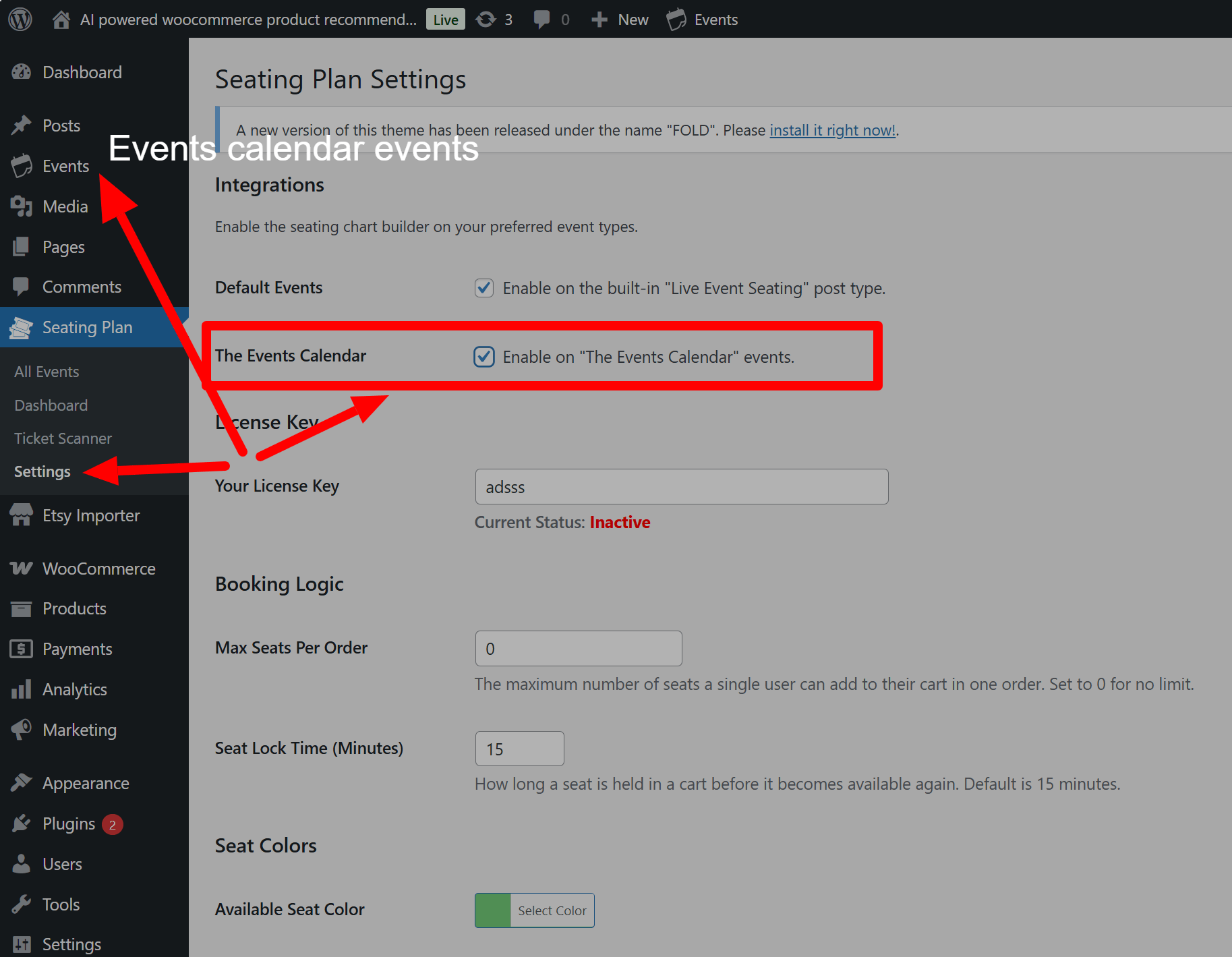
Seamless Integration: The Events Calendar & Seating Chart
Unlock the full potential of the web’s most popular events plugin! Live Event Seating now offers full, native integration with The Events Calendar, allowing you to add beautiful, interactive WordPress seating chart to your existing events with zero hassle.
Stop juggling different systems. Now you can manage your events in The Events Calendar and design your seating plans with our powerful visual builder, all in one seamless workflow. This integration works directly with WooCommerce—no extra ticketing add-ons are required!
How Our Integration Works:
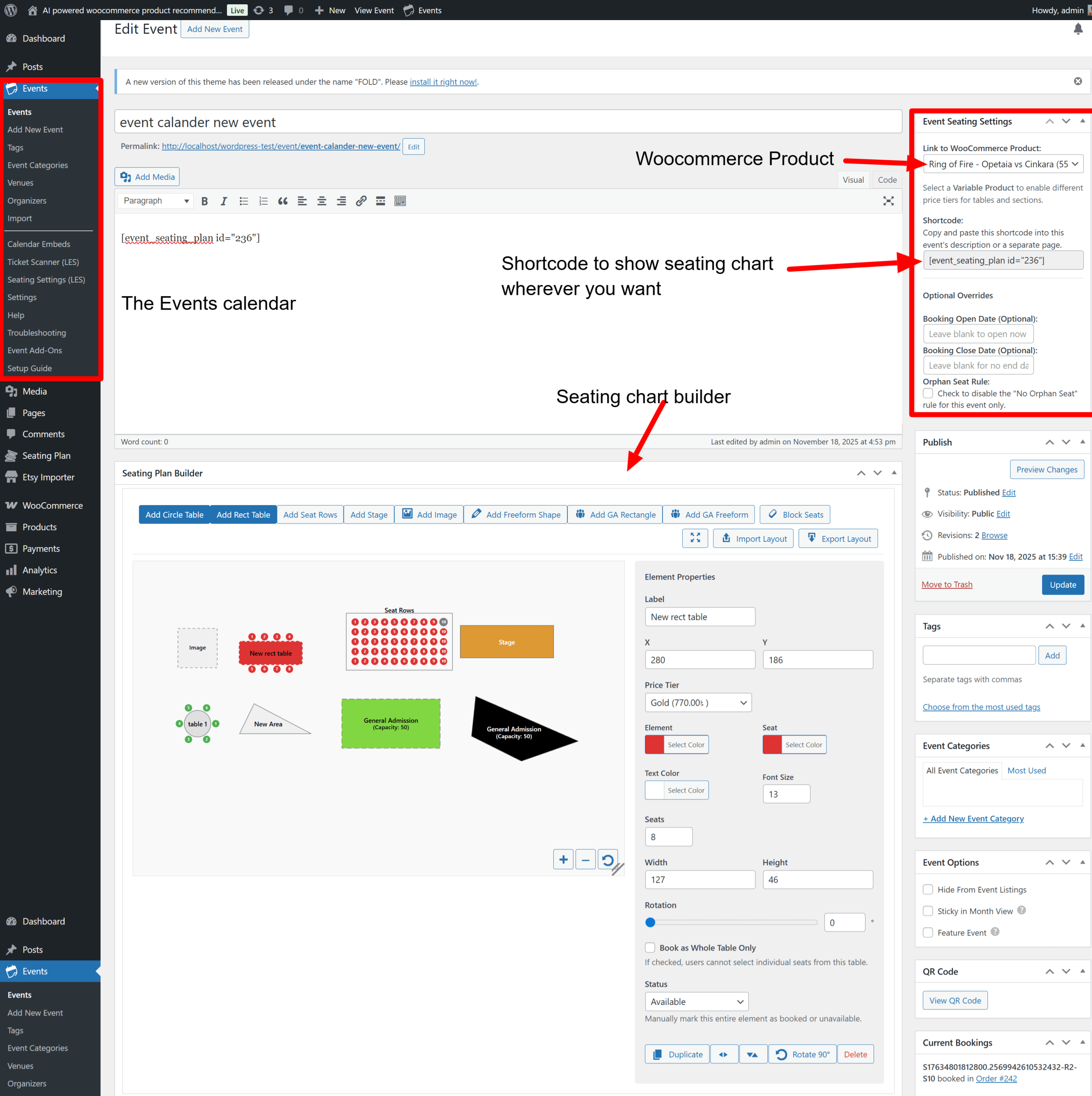
- Works With Your Workflow: Our seating chart builder appears directly on The Events Calendar’s event edit screen. There’s no need to switch between different menus.
- Direct WooCommerce Power: Simply create a Simple or Variable product in WooCommerce to represent your tickets. Then, link it to your event in our settings metabox. It’s that easy.
- Flexible Price Tiers: Use a WooCommerce Variable product to create different price tiers (e.g., VIP, Standard, Balcony). Our builder will automatically detect these variations, allowing you to assign different prices to different seats, tables, or sections on your WordPress seating chart plugin.
- Smart & Clean UI: We automatically hide redundant fields. Your event date, time, and venue are pulled directly from The Events Calendar, ensuring your data is always consistent and your admin screen is clean.
- User-Friendly Control: A simple checkbox in our settings page lets you enable or disable the integration at any time, giving you full control.
If you use The Events Calendar and need a professional WordPress seating chart plugin for your events, this is the most powerful and flexible reserved seating solution you’ve been waiting for.

A WordPress Seating Chart Plugin for Events Manager!
Unlock powerful reserved seating for one of the most popular event plugins on WordPress! Live Event Seating now offers a deep, seamless integration with Events Manager, allowing you to add our visual seating chart builder directly to your existing events.
There’s no need for complex setups or extra ticketing add-ons. Our plugin connects your beautiful seating layouts directly to WooCommerce, giving you a complete, professional booking system.
Our Events Manager Integration Features:
- A Truly Native Feel: The seating chart builder appears directly on the Events Manager edit screen. Your workflow remains familiar and efficient.
- Direct WooCommerce Power: Connect any Simple or Variable WooCommerce product to your event to handle sales. No extra plugins are required.
- Flexible Price Tiers: Use a WooCommerce Variable product to create different pricing tiers (e.g., VIP, Standard). Our builder automatically detects these variations, letting you assign different prices to seats, tables, or sections.
- Smart Data Sync: We automatically pull your event date and rich venue details (name, address) directly from Events Manager, ensuring your tickets and frontend display are always accurate and professional.
If you love Events Manager and need a robust WordPress event seating solution, this is the fully integrated, powerful plugin you’ve been waiting for.
In conclusion, Ready to upgrade your venue? These WordPress seating chart features are designed to help you sell more tickets with less effort. Get started today and experience the most powerful seating solution on the market.
Advanced Polygon & Shape Editing
Take full control over your venue layout. You can now fine-tune Freeform Sections, General Admission Areas, and Polygon Shapes after drawing them. Simply enter “Edit Mode” to reveal control points at every corner, allowing you to drag and adjust the shape to perfectly match irregular venue walls or specific floor plans.


Frontend Price Tier Filtering
Enhance the booking experience for your customers. The seating chart now automatically detects all price variations used in your layout and generates a Filter by Price dropdown on the frontend. When a customer selects a specific price tier (e.g., “VIP” or “Standard”), all matching seats remain highlighted while non-matching seats are dimmed, making it effortless to find tickets within a specific budget.
Deep Section Duplication
Speed up your workflow significantly. Previously, duplicating a Section only copied the container. Now, the Deep Duplicate feature clones the Section and every element inside it (Tables, Seat Rows, Stages, Text). Perfect for symmetrical venues—simply build the “Left Wing,” duplicate it, and move it to create the “Right Wing” in seconds.
