


A proper QR ticket scanner built into your WordPress site is the fastest way to check in attendees — and it eliminates the mess of printed lists, highlighters, and queues at the door. Most event organizers who sell tickets online still check people in the old way: a printed list, a volunteer with a highlighter, and a queue that grows while they scroll looking for a name.
Or they go the other direction and buy a dedicated scanner device, set up a separate check-in app, create accounts for door staff, and hope the app syncs properly with their ticketing system on a venue wifi that’s slower than expected.
The QR ticket scanner in Live Event Seating takes a third approach: it runs directly in the WordPress admin, works on any device with a camera, needs no app installation, and shows a clear green/red result in under 2 seconds.
Why Most Event Check-In Systems Are Overcomplicated
The standard promise of “professional check-in” usually comes with significant friction:
- Dedicated hardware scanners cost £150–£400+ per unit and need pairing with a specific app
- Mobile apps require staff to download, log in, and sometimes reconfigure on the night
- Separate SaaS platforms have their own accounts, dashboards, and sync delays with your ticketing system
- Paper lists fail when the printer runs out of ink, when a late buyer purchases at 7:58pm for an 8pm event, or when someone buys under a different name than their ID
Live Event Seating’s scanner has none of these requirements. It uses the same WordPress admin your staff already have access to, and it uses the device’s native camera — the same camera they use to take photos.
How the QR Ticket System Works End to End
Ticket Generation (Automatic)
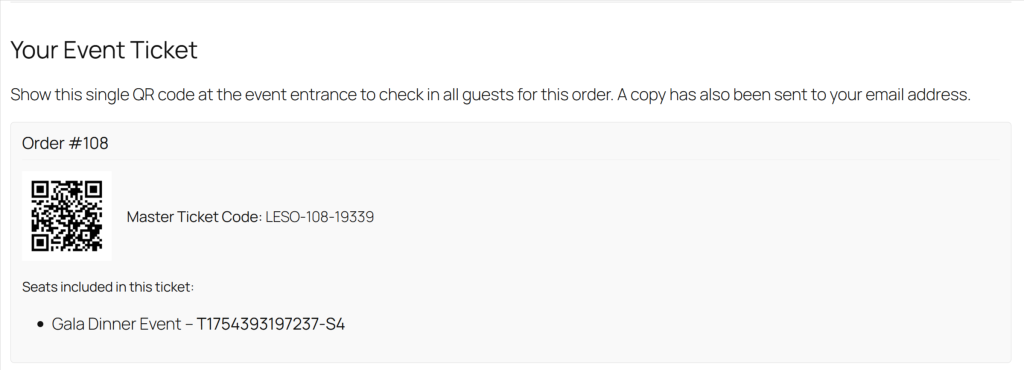
The moment a customer completes a WooCommerce checkout, Live Event Seating generates a unique QR code for their order. The QR code encodes a master ticket code that identifies:
- The WooCommerce order ID
- The specific event
- All seats included in the order
This QR code appears on:
- The Thank You page immediately after payment
- The WooCommerce confirmation email sent to the buyer’s inbox
- The downloadable PDF ticket (if you’ve configured the ticket template)
The code is generated server-side and stored — it doesn’t change between the purchase confirmation and the event day, so a screenshot taken 3 weeks ago still scans correctly.
One Code Per Order (Not Per Seat)
This is a deliberate design choice worth explaining. Some ticketing systems generate a separate QR code for every individual seat. That means a family of 4 has to scan 4 different codes at the door.
Live Event Seating uses one master QR code per order. One family booking = one scan. The scan result shows all seats on that order (e.g. “Row C, Seats 4–7”), so the door staff can verbally confirm the seat assignment if needed. This dramatically speeds up entry for group bookings.
At the Door: The Scanner Interface
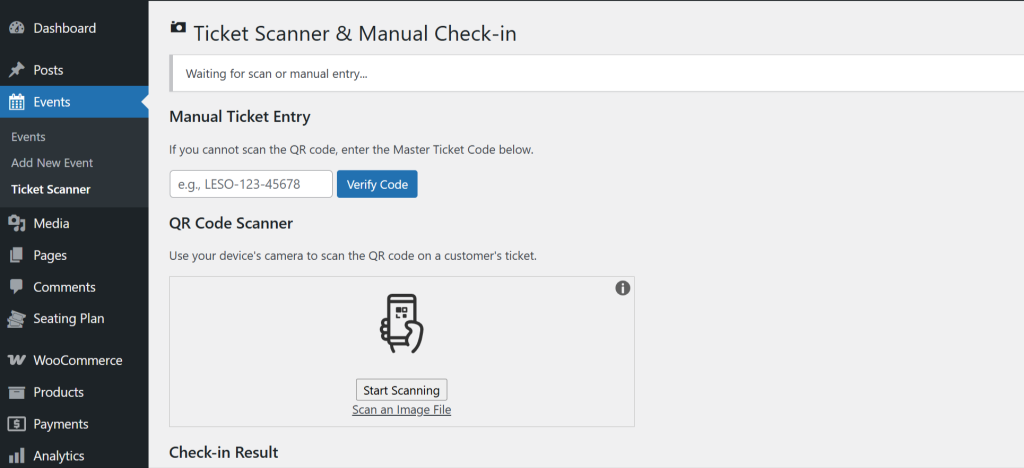
In WordPress admin, navigate to Seating Plan → Ticket Scanner. The page opens to a live camera view with a scanning frame.
Point it at a QR code on a phone screen or printout. The system reads and validates it in under 2 seconds. The result is clear and unambiguous:
✅ VALID — Not Yet Scanned Shows in green. Displays the customer’s name, order number, event name, and seat list. The booking is automatically marked as checked in.
🔁 ALREADY SCANNED Shows in amber. Displays when the ticket was first scanned and at which scanner (if multiple devices). Prevents re-entry on the same ticket.
❌ INVALID Shows in red. The QR code is not recognised in your system — could be a fraudulent ticket, a ticket for a different venue, or a corrupted code.
Manual Fallback
Below the camera view is a text input field for manual ticket code entry. If a customer’s screen is cracked, their printout is water-damaged, or they just have the email confirmation open with the order number visible, a staff member can type the code directly. The validation result is identical to a scan.
Running Multiple Scanners Simultaneously
For events with multiple entry points — front door, VIP entrance, separate session rooms — you can run the scanner on multiple devices at the same time. Each device can be logged in as a separate WordPress user with a custom role that has scanner-only permissions (no access to orders, products, or other admin areas).
All scans from all devices update the same central check-in record. If a ticket is scanned at the main entrance, the VIP entrance scanner will correctly show “Already Scanned” if someone tries to use the same QR code there.
There’s no sync delay — all scanner instances poll the same WordPress database directly.
Setting Up Scanner-Only Staff Accounts
You don’t want door volunteers to have full WordPress admin access. Create a custom user role for scanner staff:
- Create a new WordPress user for each scanner operator
- Assign the LES Scanner role (added by the plugin automatically)
- They log in and see only the Ticket Scanner page — nothing else in the admin
When the event is over, you can revoke access or deactivate the accounts. No external accounts to manage, no app licences to cancel.
Testing Before Event Day
Run a test scan before your event using the QR code from your own test order. The scanner will show it as valid and check it in — you can then go to the Booking Manager and reset the check-in status from there if you want to keep the test booking clean.
Check these before doors open:
- Device camera works at arm’s length in your venue’s lighting conditions
- WiFi or mobile data is available at the entry point (scanner needs a live connection to validate)
- Staff accounts are created and tested
- Manual entry fallback is demonstrated to all door staff
No Hardware. No App. No Sync Issues.
| Feature | Live Event Seating Scanner | Dedicated Hardware Scanner | Separate App |
|---|---|---|---|
| Hardware required | ❌ None | ✅ £150–£400/unit | ❌ None |
| App installation needed | ❌ None | Sometimes | ✅ Yes |
| Works on any device | ✅ Yes | ❌ Paired device only | ✅ Yes |
| Real-time sync with bookings | ✅ Direct | Depends | Depends on integration |
| Multiple simultaneous scanners | ✅ Yes | ✅ If purchased | ✅ Yes |
| Staff accounts with limited access | ✅ Yes | Varies | Varies |
| Works offline | ❌ Needs connection | Sometimes | Sometimes |
Check in 300 attendees in 15 minutes using the phone already in your pocket. The QR scanner is built into Live Event Seating — no extra hardware, no extra apps. Get Live Event Seating → Starting from $49.99/year · 14-day money-back guarantee · 0% per-ticket commission