

Stop selling general admission tickets for reserved-seat shows. Live Event Seating lets you build an accurate digital twin of your theater—curved rows, balconies, orchestra pits, box seats—and sell tickets directly from your WordPress site.
No per-ticket fees. No SaaS lock-in. Your data, your revenue, your venue.
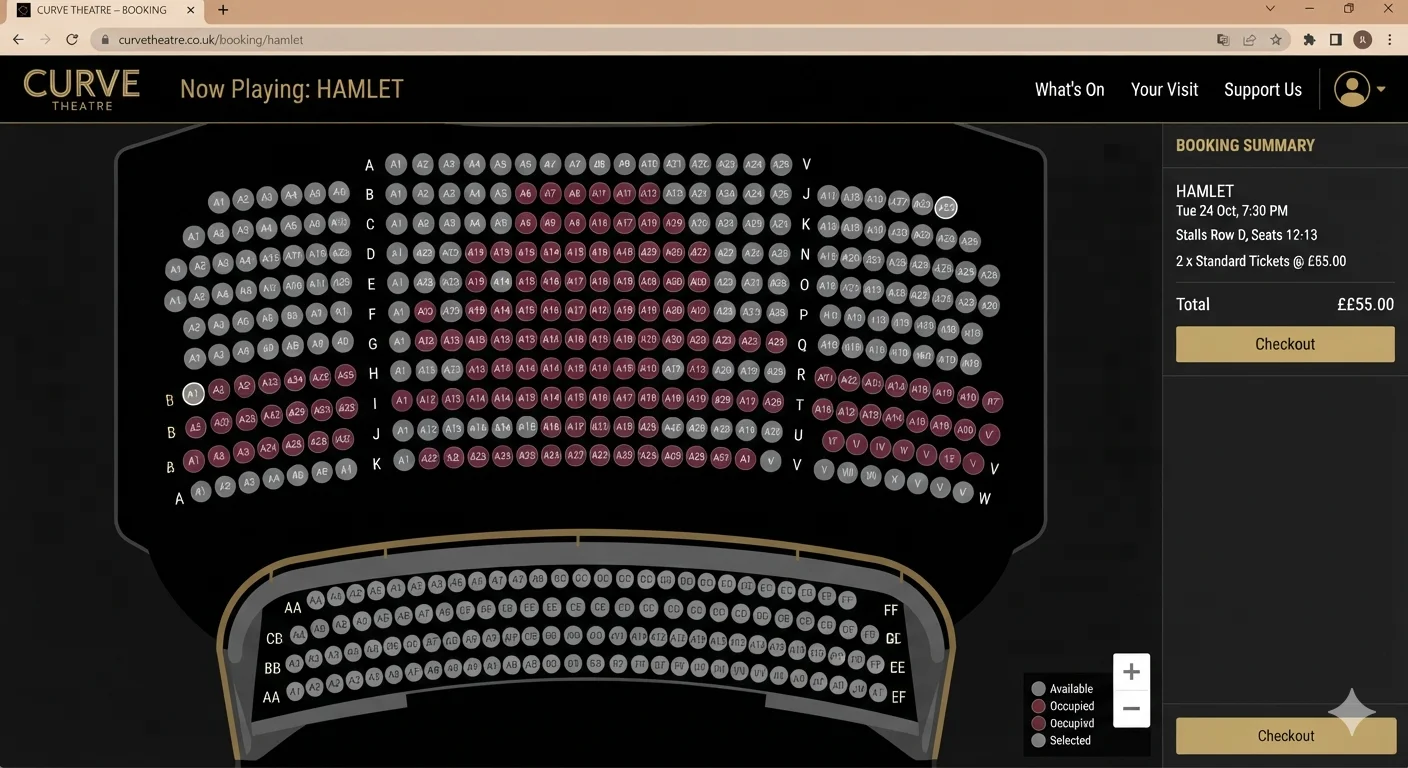
Built for Theaters, Not Generic Events
Most WordPress ticketing plugins treat seating as an afterthought. They give you a grid of squares and call it a seat map. That doesn’t work for a theater.
Live Event Seating was built for venues with real architecture:
- Curved seat rows — Replicate balconies, orchestra sections, and amphitheater arcs with a simple slider. Positive values curve one way, negative the other.
- Sections — Separate Orchestra, Mezzanine, Balcony, and Boxes into distinct areas. Customers zoom into each section on their phone.
- Seat blocks with real numbering — Row A, Seat 12. Row B, Seat 4. Match your online chart exactly to the physical seats.
- Kill seats — Remove seats blocked by pillars, sound desks, or camera positions. They stay invisible to customers.
- Accessibility marking — Mark wheelchair spaces, companion seats, and aisle seats clearly.
Your digital seat map should look like your actual theater. Live Event Seating makes that possible.
Sell Tickets Without Losing 3-7% Per Seat
Theater economics are tight. Every ticket you sell on Eventbrite or Ticketmaster loses 3-7% to platform fees before you see a dollar.
Here’s what that means for a typical theater run:
| Tickets Sold | Avg Price | Eventbrite Fees | Live Event Seating | You Keep |
|---|---|---|---|---|
| 2,000 | $45 | $3,880 | $194.99 | $3,685 |
| 5,000 | $55 | $11,442 | $194.99 | $11,247 |
| 10,000 | $60 | $25,832 | $194.99 | $25,637 |
👉 Calculate your exact Eventbrite fees →
Over a full season, the savings cover a full production budget.
What Theater Directors Ask Us
Can I sell different prices for different sections?
Yes. Use a WooCommerce Variable Product to set VIP, Standard, Balcony, and Student pricing. Assign each price tier to specific sections, rows, or individual seats in the builder.
Can I hold seats for press, staff, or comps?
Yes. Use the Block Seats tool to mark any seat as unavailable before sales open. Perfect for press rows, tech positions, and complimentary seats.
Can I sell season tickets?
Yes. Create a WooCommerce product for your season pass and assign it to specific seats. Customers pick their seats once and keep them across the season.
What about group bookings?
Group bookings are built in. Schools, corporate groups, and community organizations can book blocks of seats with a single click.
Can I check people in at the door?
Yes. The QR check-in scanner turns any phone into a check-in station. Scan tickets at the door, prevent duplicates, and track attendance in real time.
Two Ways to Get Started
Option 1 — Build it yourself
Most theaters are live within 15 minutes. Install the plugin, create your WooCommerce ticket products, and design your venue with the drag-and-drop builder.
[Get Live Event Seating — from $49.99/year →]
Option 2 — Done-For-You setup
Send us a PDF, image, or hand-drawn sketch of your theater. Our team builds a pixel-perfect digital seat map within 48 hours and delivers it as a ready-to-import template.
Real Theaters, Real Results
“This was a fantastic plugin to use and from the get-go the support was there. As someone who uses seating charts, this is definitely a go-to app for your events!”
— Bryan Coetzee, Mako Aquatics
Frequently Asked Questions
Yes. Live Event Seating offers native integration with The Events Calendar and Events Manager. Manage events in your existing calendar and design seating with our builder.
Yes. Live Event Seating runs on WooCommerce, so you can use Stripe, PayPal, Square, or any gateway you already trust. You keep 100% of ticket revenue minus standard processing.
Unlimited. There’s no cap on events or tickets in any plan.
Yes. Live Event Seating Lite is free on WordPress.org. Upgrade to Pro ($194.99/year) when you need waitlist, seat transfers, QR check-in, or advanced features.
See the full feature comparison: Live Event Seating vs Eventbrite →
See all solutions and comparisons →
Start Selling Reserved Theater Tickets This Week
[Get Live Event Seating — from $49.99/year →]
Or try the free Lite version first.