

Conference Seating Chart Plugin for WordPress
Conferences are complex. Multiple sessions, hundreds of attendees, VIP seating, press areas, sponsor tables, workshop rooms. Managing all of that on spreadsheets is a nightmare.
Live Event Seating brings your conference seating onto your WordPress site—with a visual chart attendees can navigate on their phone.
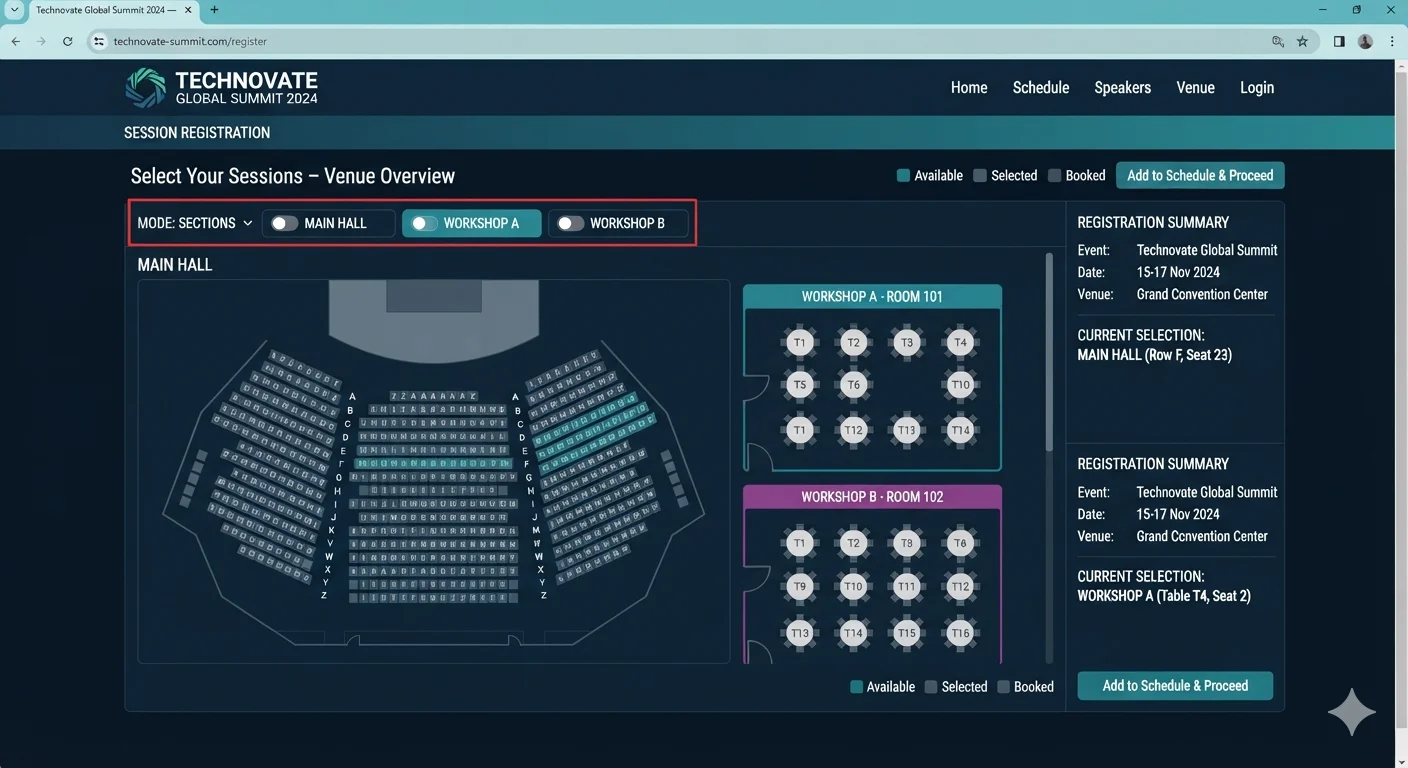
Built for Complex Conference Layouts
Your venue isn’t a single room. It’s a keynote hall, three workshop rooms, a VIP lounge, a sponsor expo, and a networking dinner. Live Event Seating handles all of it.
- Sections mode — Organize your venue into sections: Main Hall, Workshop A, Workshop B, VIP Lounge. Each section has its own seating.
- Curved theater rows — Model auditorium seating with curved rows that match your actual hall.
- GA areas with capacity — Create standing-room zones and set max capacity. The system tracks remaining spots automatically.
- Whole-table booking — Perfect for sponsor tables, VIP dinners, and roundtable sessions.
- Seat & table add-ons — Upsell lunch packages, workshop add-ons, and merchandise at the moment of booking.
- QR check-in scanner — Scan attendees in at the door with any phone.
Sell Conference Tickets Without Losing Revenue
Conference tickets are expensive. Losing 3-7% per ticket to a ticketing platform adds up fast.
Here’s what a 2,000-attendee conference at $350 per ticket looks like:
| Platform | Per-Ticket Fee | Total Fees | You Keep |
|---|---|---|---|
| Eventbrite | 3.7% + $1.79 | $29,470 | $670,530 |
| Ticket Tailor | ~1% + $0.55 | ~$8,100 | ~$691,900 |
| Live Event Seating | $0 | $194.99 | $699,805 |
That’s over $29,000 back in your conference budget—enough to cover a keynote speaker’s fee, a premium venue, or a full marketing campaign.
👉 Calculate your exact Eventbrite fees →
What Conference Organizers Ask Us
Can I sell tiered tickets (VIP, Standard, Student)?
Yes. Use WooCommerce Variable Products to create as many tiers as you need. Assign tiers to specific sections, rows, or individual seats.
Can I hold seats for press, speakers, or sponsors?
Yes. Use the Block Seats tool to mark any seat as unavailable before sales open. Perfect for press rows, speaker seating, and sponsor blocks.
Can I manage multiple sessions with different seating?
Yes. Create a separate event in Live Event Seating for each session, workshop, or dinner. Or use the Sections feature to keep them in one event with distinct areas.
Can attendees check in with a QR code?
Yes. Every ticket generates a unique QR code. Staff can scan tickets with any smartphone at the door, with duplicate-scan prevention built in.
Can I export attendee lists?
Yes. The Booking Manager dashboard lets you view every attendee across all events and export to CSV with one click.
Built for Every Kind of Conference
- Tech conferences — Multi-track events with keynote, workshop, and networking seating
- Medical conferences — CME sessions with tiered seating and sponsor tables
- Trade shows — Booth assignments, expo hall layouts, and speaker sessions
- Corporate summits — VIP seating, board dinners, and team workshops
- Academic conferences — Multi-day programs with breakouts and plenaries
- Hybrid events — In-person seating with streaming pass options
Integration with The Events Calendar
Already using The Events Calendar to manage your conference schedule? Live Event Seating integrates natively.
Add seating to any TEC event, connect a WooCommerce ticket product, and publish. Your attendees see the event in your calendar and pick their seats on the same page.
What Conference Organizers Get
Starter — $49.99/year
- 1 website
- Core seating builder
- WooCommerce integration
Basic — $96.99/year
- 5 websites
- QR scanner
- GA areas
- Add-ons (up to 2 products)
PRO — $194.99/year
- Unlimited websites
- Sections mode
- Waitlist system
- Seat transfers
- Group bookings
- The Events Calendar integration
- Booking Manager
- Full add-ons
- Ticket Transfer
- Curved Row Seats
- Visual Ticket Designer
- Seat & Table Add-ons
- Count down Timer and more
For most conferences, PRO is the right choice.
Frequently Asked Questions
Yes. Sell in-person tickets with assigned seating, and virtual passes as standard WooCommerce products.
There’s no hard limit. Venues with 3,000+ seats run smoothly. The chart uses SVG rendering and real-time polling to stay fast on any device.
Yes. WooCommerce coupon codes work exactly as expected. Restrict codes to specific ticket tiers, sections, or attendee groups.
Yes. Use Block Seats to hold specific seats for speakers, staff, and press. They remain invisible to public ticket buyers.
Yes. Live Event Seating Lite is free on WordPress.org. Upgrade to Pro for sections, waitlist, seat transfers, and The Events Calendar integration.
See the full feature comparison: Live Event Seating vs Eventbrite →
See all solutions and comparisons →
Start Selling Assigned Conference Tickets This Week
[Get Live Event Seating — from $49.99/year →]
Or try the free Lite version first.