

A restaurant seating chart plugin should feel like a reservation, not a ticket purchase — built around tables, not rows. Live Event Seating lets guests pick their exact table, add menu upgrades at checkout, and you keep every dollar — directly from your WordPress site.
No per-ticket fees. No SaaS lock-in. Your guest list, your revenue.
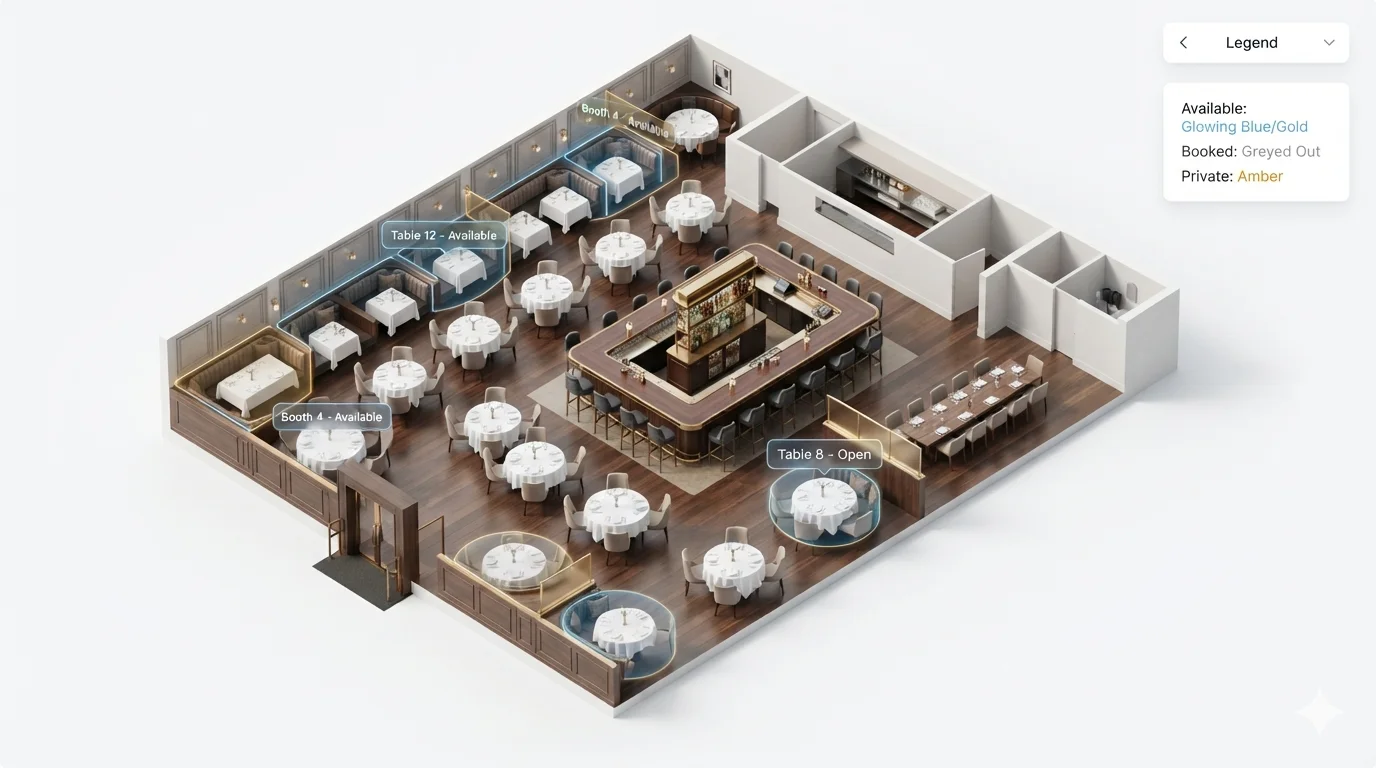
Why Restaurants Need a Dedicated Seating Chart Plugin, Not a Generic Ticket Tool
Restaurant events run on tables, upsells, and personal touches — not rows of identical seats:
- Whole Table Booking — A guest or host books an entire table in one click instead of selecting seats one by one.
- Seat & Table Add-ons — Upsell a wine pairing, prix fixe upgrade, or dessert course directly at checkout, attached to specific seats or tables.
- Guest Name Assignment — Attach a specific attendee name to each seat after purchase, so your place cards show real names, not billing names.
- Freeform table layouts — Arrange round and rectangular tables exactly as your dining room is laid out.
- Multi-Date Events — Run a recurring series (monthly wine dinners, seasonal tasting menus) from one layout.
Built to feel like a reservation, not a ticket purchase.
Sell Seats Without Losing 3–7% Per Guest
| Tickets Sold | Avg Price | Platform Fees (Eventbrite-style) | Live Event Seating | You Keep |
|---|---|---|---|---|
| 100 | $85 | $366 | $194.99 | $171 |
| 500 | $85 | $1,828 | $194.99 | $1,633 |
| 2,000 | $85 | $7,310 | $194.99 | $7,115 |
(Figures illustrative.)
👉 Calculate your exact numbers →
Across a season of special dinners, the savings add up to real margin.
What Restaurant & Event Owners Ask Us
Can guests book an entire table in one click?
Yes. Whole Table Booking lets one person reserve all seats at a table instantly — ideal for groups and private parties.
Can we upsell a wine pairing or menu upgrade at checkout?
Yes. Seat & Table Add-ons let you attach any WooCommerce product as an optional upgrade, shown in an interactive modal before checkout.
Can we assign specific guest names to each seat for place cards?
Yes. Guest Name Assignment lets you attach a real attendee name to any seat after purchase — your CSV exports and place cards show actual names.
Can we run a recurring monthly dinner series from one layout?
Yes. Multi-Date Events let you attach a full schedule to a single table layout.
Can we use the payment processor we already have?
Yes. Runs on WooCommerce, so Stripe, PayPal, Square, or any gateway you already use.
Two Ways to Get Started
Option 1 — Build it yourself
Most dining rooms are live within 30 minutes. Install the plugin and arrange your tables with the drag-and-drop builder.
Get Live Event Seating — from $194.99/year →
Option 2 — Done-For-You setup
Send us your floor plan or a photo of your dining room. Our team builds a ready-to-import table layout within 48 hours.
Real Venues, Real Results
“Easy to use plugin, amazingly fast support — this is exactly what we were looking for in a seating chart and reservations plugin.”
— oddych, via WordPress.org review
Frequently Asked Questions
Does this work for a one-off private event, not just recurring dinners?
Yes. Build a single table layout for any one-time gala, fundraiser, or private dinner just as easily as a recurring series.
Can I use my own payment gateway?
Yes. You keep 100% of ticket revenue minus standard processing.
Is there a free version?
Yes. Live Event Seating Lite is free on WordPress.org. Upgrade to Pro for table add-ons and guest name assignment.
See the full feature comparison: Live Event Seating vs Eventbrite →
See all solutions and comparisons →
Start Taking Table Reservations This Week
Get Live Event Seating — from $49.99/year →
Or try the free Lite version first.