


Whole Table Booking is the right selling mode for gala dinners, charity fundraisers, wedding receptions, and corporate award evenings — events where you’re not selling individual seats, you’re selling tables. A “Gold Sponsor Table for 10” at your annual fundraiser is a £1,200 transaction. A “Family Table for 8” at a wedding reception is a meaningful group booking. Making that buyer click ten individual seats on a seating map is not just inconvenient — it’s a misrepresentation of what they’re actually purchasing.
The Whole Table Booking mode in Live Event Seating treats the table as the unit of sale, exactly as it should be for these event types.
The Problem with Selling Tables as Individual Seats
When you configure a round table for 10 and leave it in standard seat-selection mode, you create several problems:
The buyer doesn’t understand what they’re buying. A corporate sponsor committing to a sponsorship package expects to “buy the table” — not pick 10 individual chairs. The individual-seat interface implies anyone could buy one of those chairs, which is wrong.
Groups get split up accidentally. If the table is publicly available, nothing prevents two different buyers from claiming seats at what was meant to be a private corporate table.
The checkout is confusing. Ten line items for “1 × Conference Ticket” at the same price, listed separately in a WooCommerce cart, doesn’t communicate “you’ve bought a table for 10.”
Pricing doesn’t make semantic sense. A table of 10 at £120/head might be priced as £1,200 total. Representing that as 10 × £120 seats adds mental arithmetic for the buyer and doesn’t convey the premium “table package” feeling the event is selling.
Whole Table Booking solves all four of these in one toggle.
How Whole Table Booking Works
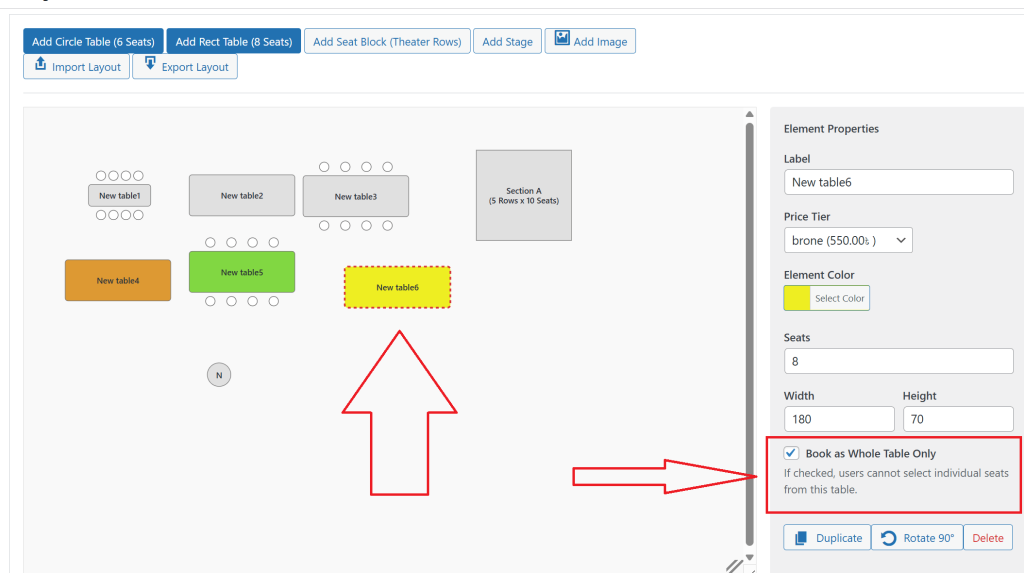
In the Live Event Seating builder, select any round or rectangular table and enable Whole Table Booking in the settings panel.
What changes immediately:
In the builder: Individual seat circles disappear. The table shape is displayed as a single bookable element, typically with the label you’ve set (“VIP Table”, “Gold Sponsor”, “Table 5”).
On the frontend map: Buyers see the table as a coloured shape — green when available, grey when booked. Individual seat dots are not shown. Clicking the table selects it as a whole.
In the cart summary panel: Instead of “Row A, Seat 1” through “Row A, Seat 10,” the selection shows one clean line: “VIP Sponsor Table (10 seats) — £1,200.”
In the WooCommerce cart: One line item at the total table price. Not ten. The cart is clean and the buyer immediately understands what they’ve purchased.
After checkout: The WooCommerce order shows one line item. The booking manager records the order against all ten seats simultaneously. The seating map marks the entire table as booked. The QR ticket generated is one master code for the whole table booking.
Pricing a Whole Table
Whole Table Booking uses WooCommerce variable products the same way tiered seat pricing does. Create a product variation for “VIP Sponsor Table” and set its price to your total table cost (e.g. £1,200 for 10 seats). Assign that variation to the table in the builder.
The buyer pays £1,200. WooCommerce records a sale of £1,200. The table is blocked for all 10 seats. No calculation required on either side.
If you offer different table types at different prices — “Gold Table (£1,200)”, “Silver Table (£900)”, “General Table (£650)” — each table in your map can be assigned to a different product variation, all on the same seating chart.
Who Should Use Whole Table Booking
Charity gala dinners: Sell sponsor and patron tables as premium packages. Each table is one purchase, one invoice, one QR code at the door.
Corporate award ceremonies: Companies buying employee tables want to purchase the whole table, not coordinate 10 separate individual ticket orders.
Wedding receptions: Families and friend groups booking a table together should have one clean transaction, not one person trying to coordinate 8 people all buying tickets simultaneously.
Comedy club or cabaret venues: Small round tables where the experience is table-based (shared bottle of wine, communal seating) sell better as table units than as individual seats.
Conference gala dinners: The networking dinner after a day conference sells sponsor tables and corporate group tables alongside standard individual places — Whole Table Booking handles the sponsor tables while individual seat booking handles everything else, all on the same map.
Mixed Mode: Tables and Individual Seats on the Same Map
You don’t have to choose between Whole Table Booking and individual seat selection — they can exist simultaneously on the same seating chart.
A common configuration for a charity dinner gala:
- Front 3 tables (round, 10 seats each): Whole Table Booking — “Platinum Sponsor” at £2,000 each
- Middle 8 tables (round, 8 seats each): Individual seat booking — “Standard Dinner Ticket” at £95/seat
- Back 4 tables (rectangular, 6 seats each): Individual seat booking — “Budget Package” at £65/seat
The same seating map shows all three zones clearly. A corporate sponsor clicks their platinum table — one click, one transaction. An individual delegate clicks their preferred seat — standard checkout. Both flows exist simultaneously, and both are handled correctly by the same WooCommerce integration.
Check-In for Table Bookings
On event night, a table booking generates one master QR code covering all seats at the table. When scanned at the door, the result shows: “Table booked: VIP Sponsor Table — 10 seats — Customer: [Company Name].”
Door staff know immediately: this is a 10-person table, they’re all arriving together on this one code. No need to look up 10 individual tickets.
If you need to check in individuals at a shared table separately, the Booking Manager allows manual check-in by name — so you can mark individual arrivals within a table booking without requiring each person to have their own QR code.
Sell your tables the way they’re meant to be sold — as one unit, one transaction, one experience. Enable Whole Table Booking in any table’s settings. Takes 30 seconds. Get Live Event Seating → Starting from $49.99/year · 14-day money-back guarantee · 0% per-ticket commission
Ready to Sell Walk-In Tickets the Smart Way?
Get Live Event Seating Pro and unlock manual order ticketing, the visual seat builder, QR check-in, and every Pro feature — in one plugin with zero per-ticket fees.