



Are you tired of the limitations of standard WooCommerce coupons? While coupons are great for simple promotions, they fall short when you want to create smarter, targeted offers. What if you want to offer a discount only to VIP customers who spend over $100? Or what if you want to run a sale that applies if a customer buys from the “Summer” category OR uses a specific coupon code? This requires WooCommerce advanced cart discounts.
Standard coupons can’t handle these complex scenarios. To build a truly dynamic promotional strategy, you need a rule-based engine that supports conditional logic.
Our Quantity Discounts & Pricing plugin includes a powerful Cart Rules engine designed for exactly this purpose. It allows you to create multiple groups of conditions with “AND/OR” logic for ultimate flexibility.
What Are “AND/OR” Conditions?
Understanding this logic is key to building advanced discounts.
- “AND” Conditions: All conditions within a single group must be true. For example: (Cart subtotal is over $50 AND user role is Member).
- “OR” Conditions: The discount applies if any of the condition groups are true. For example: (Group A is true OR Group B is true).
Combining these gives you limitless possibilities for your promotions.
Step 1: Create a New Cart Discount Rule
Let’s build a rule for this scenario: “Get 20% off if you are a logged-in customer spending over $150, OR if you have any ‘Featured Product’ in your cart.”
- Navigate to WooCommerce > Quantity Discounts > Cart Discount Rules.
- Click “Add New Cart Rule”.
- Give it a title that your customers will see, like “Special Order Discount.”
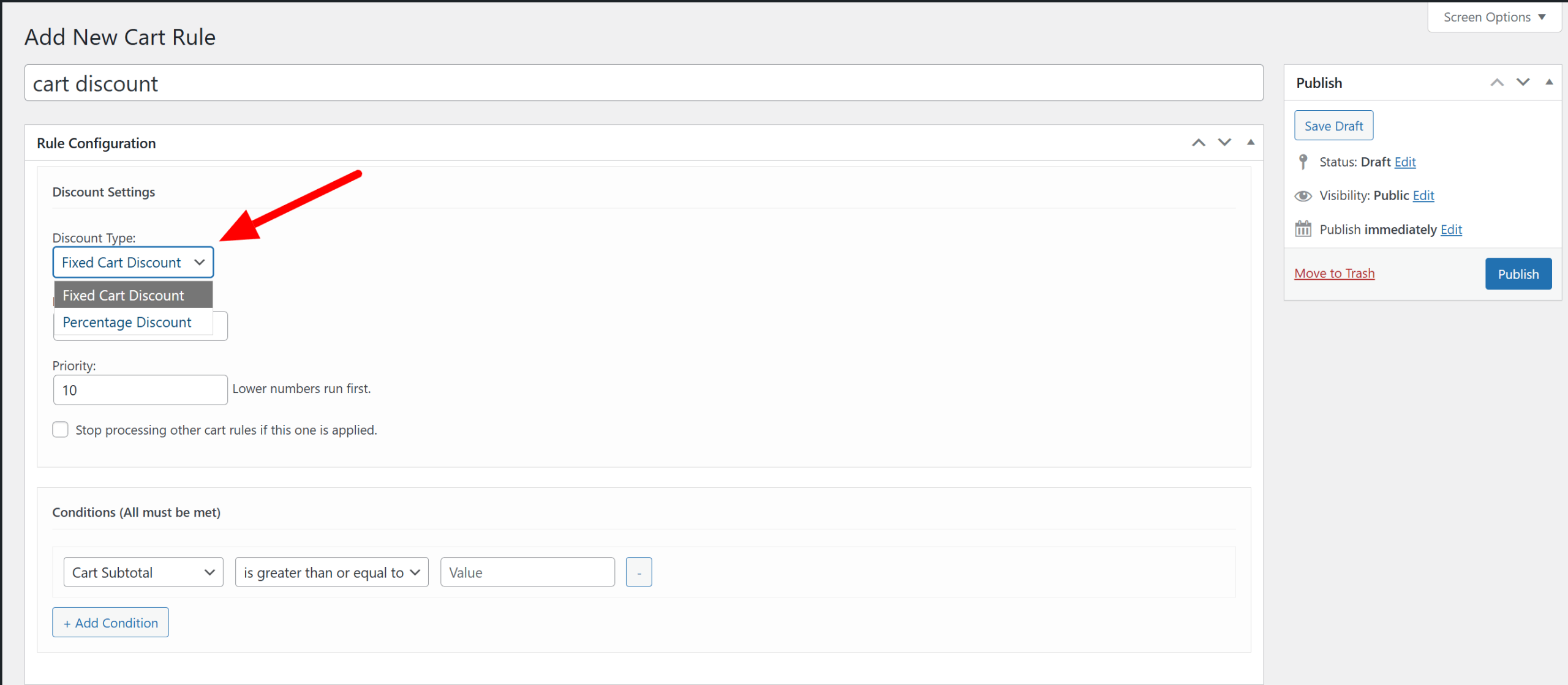
- Set the Discount Type to Percentage Discount and the Amount to 20.
Step 2: Build Your First Condition Group (The “AND” Block)
This will be for our logged-in customers. The first group is created for you by default.
- Click + Add “AND” Condition.
- Condition 1: Set the type to Cart Subtotal, the operator to is greater than or equal to, and the value to 150.
- Condition 2: Set the type to User Role and select Customer from the dropdown.
This group is now complete. It will only be valid if both of these conditions are met.
Step 3: Add an “OR” Condition Group
Now, let’s add the second part of our rule.
- At the bottom, click the + Add “OR” Condition Group button. A new group will appear, separated by an “OR” divider.
- In this new group, click + Add “AND” Condition.
- Condition 1: Set the type to Product(s) in Cart and search for your ‘Featured Product’.
Step 4: Publish Your Advanced Discount
Click Publish. Your rule is now live.
The plugin will now check every customer’s cart. It will apply the 20% discount if:
- (The user has the ‘Customer’ role AND their subtotal is >= $150)
- OR
- (The ‘Featured Product’ is in their cart)
This level of flexibility is something default WooCommerce simply cannot do. As explained by marketing experts at HubSpot, conditional logic is key to creating personalized customer experiences.
Take Control of Your Promotions
Stop settling for basic coupons. With WooCommerce advanced cart discounts, you can create intelligent, targeted promotions that drive conversions and increase customer loyalty. Build the exact promotional strategy you’ve always wanted.
Ready to unlock a new level of promotional power?