


Your Event Booking Page Should Work for Every Guest
If you need a wheelchair accessible seating WordPress event plugin, you are in the right place. Most WordPress event tools ignore accessibility entirely. When a guest with mobility needs visits your booking page, they cannot tell which seats are wheelchair accessible. They see a seating map with no accessibility information at all.
So they do one of three things. They call your venue. They email and wait for a reply. Or they simply give up and book elsewhere.
The new Wheelchair & Accessibility Seat Marking feature in the Live Event Seating WordPress seating chart plugin solves this directly. Furthermore, it takes just minutes to set up.
Why Accessibility Seating Information Matters So Much
Guests With Mobility Needs Deserve a Clear Booking Experience
Booking a ticket should be simple for everyone. However, when accessible seats are not clearly marked online, the booking process becomes a barrier. As a result, guests with disabilities often feel excluded before your event even begins.
This damages your reputation. Moreover, it can reduce attendance from a loyal and underserved audience segment.
Phone Calls and Emails Create Unnecessary Work for Your Team
Without clear accessibility information on your booking page, your staff fields the same question repeatedly. “Is Seat B4 accessible?” “Can I bring a wheelchair to Row C?” These calls take time away from more important event preparation tasks.
Marking accessible seats clearly on the seating map eliminates this problem entirely. Consequently, your team saves time and your guests feel respected.
Accessibility Is an Ethical and Legal Responsibility
In many countries and regions, providing accessible seating options is not optional. It is a legal requirement for public events. Even where it is not strictly required, offering clear accessibility information is simply the right thing to do.
How the Wheelchair Accessible Seating WordPress Event Plugin Works
Mark Any Seat as Accessible Inside the Visual Builder
The process is simple. Open your seating layout in the drag-and-drop builder. Click any seat or group of seats. Then enable the accessibility flag for those seats.
You can mark individual seats, full rows, or entire sections as accessible. The plugin stores this information as part of your seating layout. Therefore, it carries over automatically every time you reuse the layout for a new event.
Guests See Clear Accessibility Icons on the Frontend Map
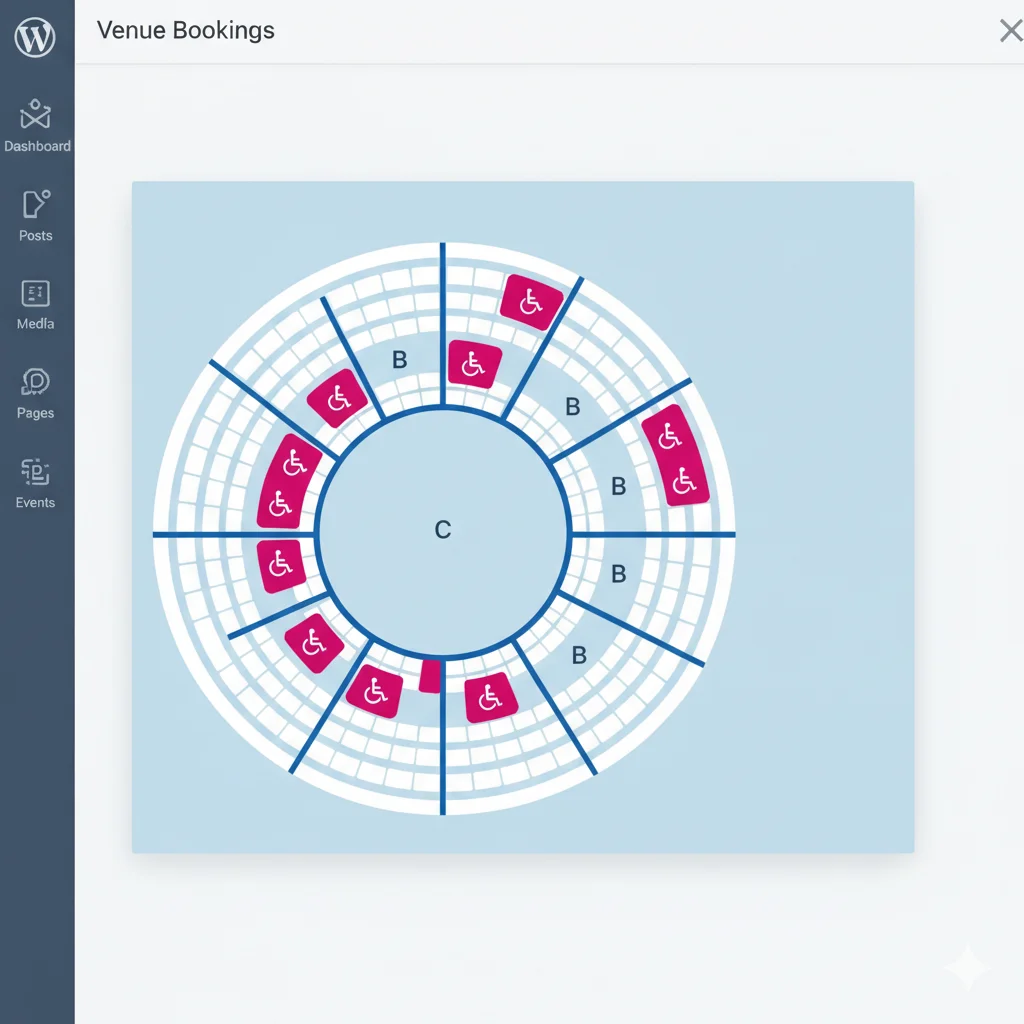
Once you mark seats as accessible, they appear on the live booking page with a visible wheelchair accessibility icon. This icon is clear and universally recognizable.
Guests who need accessible seating can spot these spots immediately. They do not need to call, email, or guess. They simply see the icon, click the seat, and complete their booking like any other customer.
Accessible Seats Work with All Existing Booking Features
Accessibility marking works alongside every other feature in the plugin. You can still apply tiered pricing to accessible seats. You can still block them for VIP holds. Furthermore, the real-time seat locking system prevents double-bookings on accessible seats just like any other seat.
Who Benefits from Accessibility Seat Marking in WordPress
Theaters and Performance Venues
Theaters often have specific accessible areas near the aisle or at floor level. Now you can mark those exact seats on your digital map so guests know where they are before they arrive.
Concert Organizers
Standing concert venues often have a dedicated accessible viewing platform. With this feature, you can define that area clearly on your seating chart and sell spots within it directly online.
Gala Dinners and Corporate Events
At seated dinner events, wheelchair users often need a specific table configuration or extra aisle space. Marking those tables as accessible lets guests self-select without any staff assistance.
Conference and Seminar Planners
Front-row or aisle seats in conference rooms are often the most accessible. Marking them clearly helps guests with mobility needs feel genuinely welcome — not like an afterthought.
Accessible Seating and the Broader Plugin Features
Accessibility seat marking is one part of a much larger set of WordPress seating chart features built into the Live Event Seating plugin. Other features your accessible guests will also appreciate include:
- Mobile-ready touch interface — guests can zoom and pan the seat map on any smartphone
- Seat Add-ons — offer mobility aids, companion seats, or premium packages at booking
- Booking Manager — your team can check in accessible guests manually with one click on event day
- Waitlist system — if accessible seats sell out, guests can join a waitlist automatically
Together, these tools help you create a genuinely inclusive booking experience from start to finish.
Frequently Asked Questions
Can I mark multiple seats as accessible at the same time?
Yes. You can select multiple seats at once in the builder and apply the accessibility flag to all of them in a single action.
Do accessible seats cost extra to set up?
No. Accessibility seat marking is part of the plugin’s standard seat configuration tools. There is no extra charge or separate module.
Can I assign different pricing to accessible seats?
Yes. Accessible seats still support tiered pricing through WooCommerce variable products. You can price them the same as standard seats or set a different rate — your choice.
Does accessibility marking work on mobile booking pages?
Yes. The frontend seating map is fully responsive. Accessibility icons display correctly on all screen sizes and work with touch navigation.
Is this feature available on the Starter plan?
Accessibility seat marking is available across all plans. Check the full features comparison to see what each plan includes.
Make Every Guest Feel Welcome Before They Even Arrive
Accessible seating is not a bonus feature. It is a basic expectation your guests have — and rightfully so. With wheelchair accessible seat marking in the Live Event Seating plugin, you give every guest the same clear, confident booking experience.
Moreover, you remove a common source of pre-event phone calls and support emails. Your team stays focused. Your guests feel respected. Everyone wins.
Find more helpful tips and plugin updates on the macmonir.net blog.
♿ Ready to Make Your Events Truly Accessible?
Mark accessible seats in minutes. No coding. No extra plugins.
Get the Live Event Seating Plugin →
Includes a 14-day money-back guarantee. Zero per-ticket commission. Full venue control.Share